Philips Sonicare ProtectiveClean 6500 Motor Replacement
ID: 171922
Description: If your Philips Sonicare ProtectiveClean 6500...
Steps:
- Pry the bottom cap away from the toothbrush body.
- If it is not easy to open, these alternative instructions may help you.
- Pry the bottom cap away from the toothbrush body until it releases.
- Remove the bottom cap by hand.
- Use a metal spudger to release the two retaining clips inside the device.
- The clips release when pried inward.
- Slide the internal assembly out of the chassis.
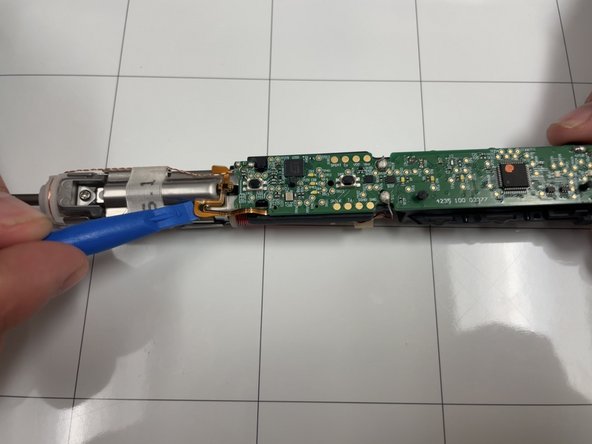
- Use an opening tool to gently pry the ribbon cable away from metal motor chassis.
- Locate the twisted copper wires feeding from the top of the motor to the upper corner of motherboard.
- Desolder the contact points.
- Soldering can cause burns and fires. Always solder in a well-ventilated workspace.
- Desolder the two connections.
- Turn the assembly over and remove the Phillips screw.
- Pull the motherboard and motor gently away from the motor chassis.
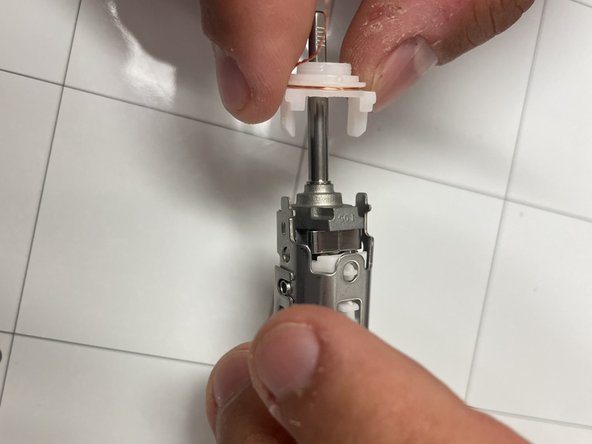
- Use a pointed tool to push in the tabs on either side of the white assembly .
- Pull the wire carrier off of motor chassis.
- Swap it to the new motor chassis.