Withings ScanWatch: Reattach the Loose Sensor Cover
ID: 173832
Description: This guide shows how to reattach the loose...
Steps:
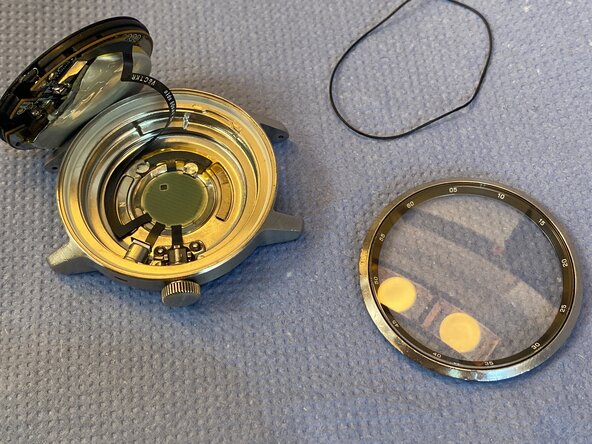
- The watch is held together by friction and a thin black gasket. There are no screws or glue.
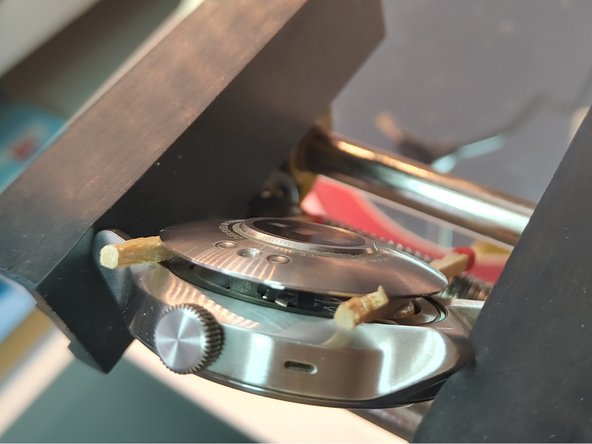
- Place a thin metal smartphone opening tool between the metal case and the glass/display side of the watch, not on the sensor side.
- Work your way around the watch carefully to release the gasket.
- Once the watch is open, you can see the movement and a small cable connecting the sensor to it.
- The cable has an iPhone-like connector and can be released with a plastic spudger.
- Carefully pry the connector straight up to avoid damage.
- Do not pull on the cable. Disconnect the connector first.
- Remove any old adhesive residue from the case and sensor cover.
- Clean both surfaces with isopropyl alcohol and a cotton swab.
- Do not scratch the glass or sensor area.
- Apply a thin, even layer of adhesive around the edge.
- Keep adhesive away from the sensor opening and the crown.
- Less adhesive is better here.
- Set the sensor cover straight into the case.
- Press it evenly until it sits flush.
- Check that the crown still moves freely.
- Stop if the cover tilts or sits unevenly.
- Hold the watch with light pressure until the adhesive sets.
- Let the repair cure completely.
- Check the crown and sensors after curing.
- Water resistance is not guaranteed after this repair.
- For more on water resistance, see the Withings help page: Withings help on water resistance.