iRobot Roomba i6 Cleaning Head Module Replacement
ID: 175977
Description: The following guide will show you how to remove...
Steps:
- Using your PH2 size screwdriver, remove the edge sweeping brush by unscrewing the single screw
- Using your PH2 screwdriver, remove all 5 of the screws.
- The two screws up top will keep unscrewing all the way if you don't stop. Stop unscrewing as soon as you feel a noticeable change in resistance.
- After all screws are unscrewed, gently lift the bottom cover straight up from the two points the arrows are pointing to.
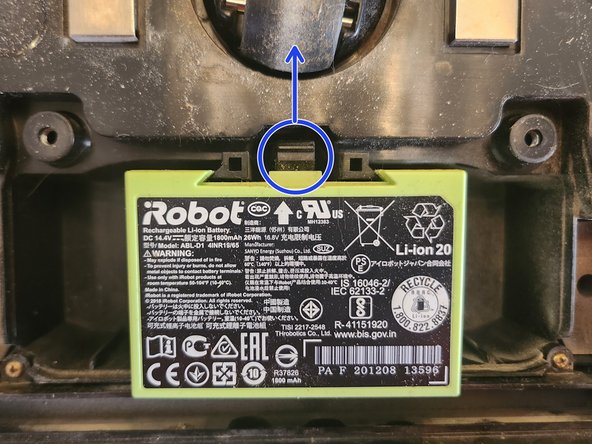
- It is very important to remove the battery before removing any electrically connected components, as a screwdriver could possibly cause a short in the electronics and the battery could explode.
- Remove the battery by pushing the plastic clip up and lifting the battery out of the Roomba.
- Press the button to remove the dustbin and set it aside.
- Unscrew all 4 screws highlighted in red using your PH1 size screwdriver.
- IMPORTANT Do not try to remove the screws. Just unscrew them until they are no longer biting any threads. When you remove the module, the screws will stay with the module.
- After all screws are removed, gently lift the cleaning module by inserting your fingers into the slit highlighted in blue and lifting straight up.