Philips Roller Controller Repair
ID: 176211
Description:
Steps:
- Remove the 5 screws on the bottom edge.
- Detach the top cover.
- Watch out for the connector for the buttons on the right side. Disconnect it.
- Disconnect the two connectors. Note their position for reassembly.
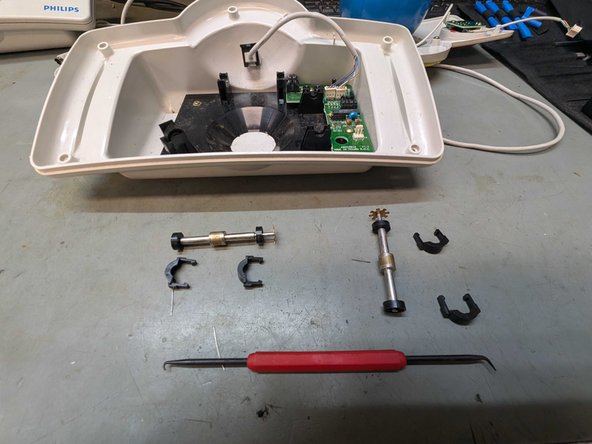
- You can pull the tabs on both sides slightly outward and then carefully pull the clip upward.
- Use a pick to carefully release the bearing retainer.
- Remove the two screws and you can take out the PCB.
- Replacement parts you need:
- 4x LTR-301 Infrared Receiver
- 4x LTE-302 Infrared Emitter
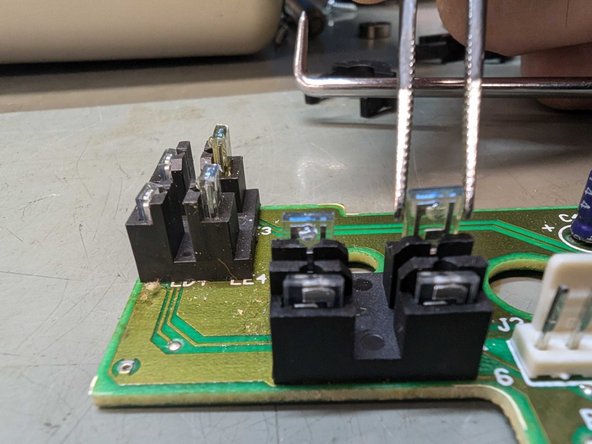
- The emitters, LTE-302, are mounted on the inside and replace the BLUE-tinted emitters.
- The receivers are positioned against the outer edge of the board. These are the LTR-301 types.
- Often only the emitters are faulty, but we prefer to replace both the emitters and the receivers.
- Desolder the emitters.
- Place the replacement parts and solder them back into place with a little flux.
- Ensure that you place the parts neatly into the holder and that both the receiver and the transmitter are at the same height.
- You can reassemble the controller in reverse order.