IBM Thinkpad 700C Battery Pack Disassembly
ID: 176472
Description: Thinking about replacing the cells in your...
Steps:
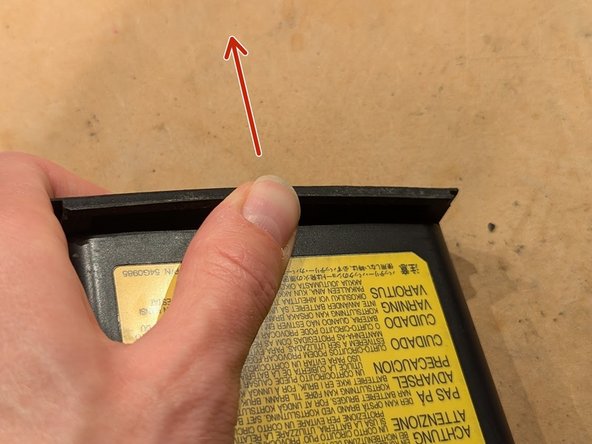
- Remove the locking battery front faceplate by pushing it from the middle away from the battery pack until it bends a few mm.
- While still applying forward pressure, slide the faceplate up and away from the battery.
- On the faceplate end of the battery, locate the seam between the two plastic halves. Slowly work a sharp knife between the two halves exactly as shown here.
- The plastic tab that projects here has not been ultrasonically bonded like the rest of the case. You're using this to gain leverage on the parts that are bonded.
- Don't let the knife slip and injure yourself. Plan your actions so that if the knife slips, it will move away from your other hand and the rest of your body.
- You're trying to open up a gap between the two halves so that you can fit larger tools in between.
- Once you've opened up a small gap, insert a larger tool and continue to work it around, widening the gap even more. You might hear the case halves starting to crack apart.
- With a thicker tool, you can twist it side to side to put more pressure on the case.
- Repeat this with the other side of the faceplate end of the battery.
- Using progressively thicker and stronger tools, keep prying until the faceplate end of the battery cracks into two halves.
- Using a metal spudger (left), chase the side seam with a Jimmy device (right). The spudger puts pressure on the seam and the Jimmy device gives it the final push to crack open.
- Do this to the other side as well.
- To break apart the corner seams at the rear, twist the two halves as shown. Go in both directions to work both the corner seams and crack them apart.
- Jam a spudger in the newly opened rear corners and crack the seam going up to the battery connector.
- You might also try lifting the top cover from the faceplate end while doing this to apply more pressure to the rear seam.
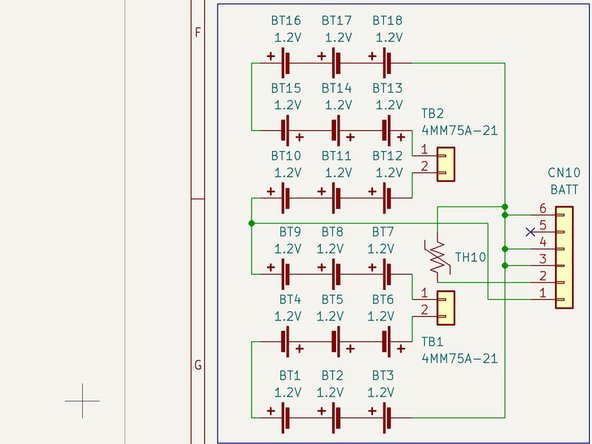
- The cover lifts off, exposing the eighteen 3/4A NiMH cells inside.
- The device on top, with the black and white wires, is a thermistor for sensing the temperature of the pack.
- There are two safety devices (not shown) which connect in series with each of the two series strings of cells. They are Klixon 4MM75A-21 overcurrent/overtemperature protection devices which use a bimetallic strip to break the circuit.