iPhone 16 Plus Pentalobe Screws Replacement
ID: 177852
Description:
Steps:
- Allow your phone's battery to drain below 25%, as a charged lithium-ion battery is a potential safety hazard.
- Unplug any cables from your phone.
- Hold the power and either volume buttons and slide to power off your phone.
- If your screen or back glass is badly cracked, lay overlapping strips of packing tape over the glass to protect yourself and make disassembly easier.
- Make sure there's a smooth area near the bottom edge that's big enough for a suction cup to stick to.
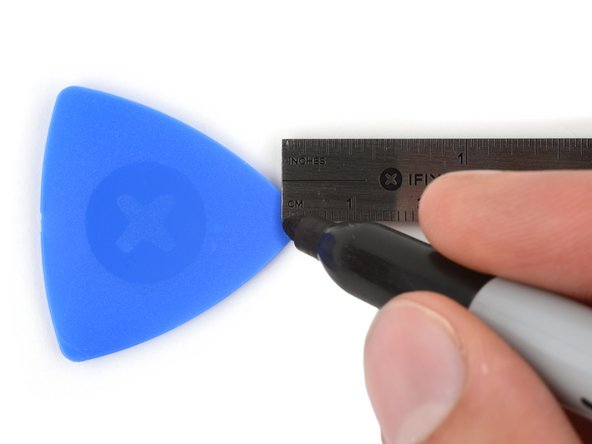
- If inserted too far, an opening pick can damage your device. Follow this step to mark your pick and prevent damage.
- Measure 3 mm from the tip and mark the opening pick with a permanent marker.
- You can also mark the other corners of the pick with different measurements.
- Alternatively, tape a coin to a pick 3 mm from the tip.
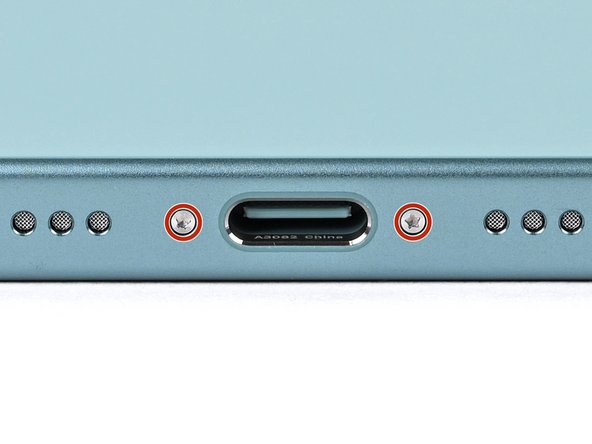
- Use a P2 pentalobe driver to remove the two 7.7 mm-long screws on either side of the USB-C port.