2006-2011 Honda Civic Cruise Control Switch Replacement
ID: 178021
Description: For a system that most people use regularly...
Steps:
- Disconnect your car battery with the 10 mm wrench so as not to shock yourself when working on the car.
- You don't need to disconnect it completely, just removing one of the connecting cables is adequate.
- Take off the plastic cover underneath the wheel with a prying tool to access the airbag connector.
- Disconnect the airbag connector.
- Use a T30 Torx bit attached to a torque wrench and take out the screws on each side of the steering wheel that connects the horn cover.
- Remove the horn cover and disconnect the horn.
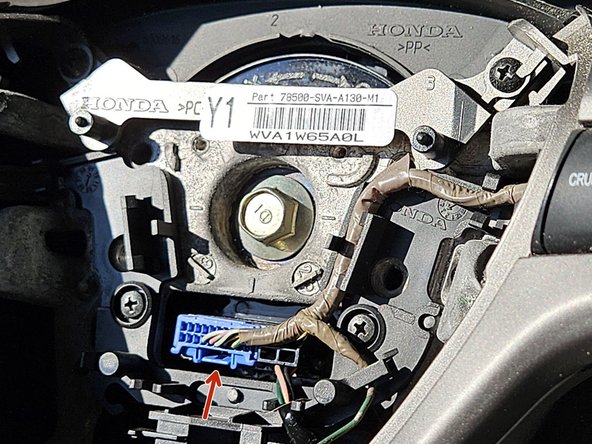
- After removing the horn cover, make sure to disconnect the cruise control switch itself. To do this, simply press the tab on the blue plug as shown by the red arrow and pull it out.
- Using your Phillips screwdriver, remove the six screws on the back of the steering wheel and the four main screws connecting the trim to the main steering wheel.
- To get to some of these screws you might need to move the steering wheel itself, so make sure your key is in the ignition in order to do so.
- Also to note, two of the screws are slightly hidden and are near the same area of the screws for the airbag.
- Gently remove the trim from the steering wheel so that you can access the two screws on the back connecting the switch to the wheel.
- Don't forget to also disconnect the switch itself either at this step or the one prior so that you may actually remove said switch.
- Use a Phillips screwdriver to remove the two screws on the back of the switch so you can replace it with your new one.
- For models with audio controls in the steering wheel, the number of screws goes from two to four as there is the other side to disconnect.