Lenovo IdeaPad 330-15IKB 81DE Speaker Replacement
ID: 179136
Description: Are your speakers not outputting the correct...
Steps:
- Ensure the laptop is powered off.
- Turn the device over so the bottom is facing up.
- Remove the 13 6 mm screws from the bottom of the device using a Phillips #0 screwdriver.
- Carefully glide a Jimmy along the seam of the casing.
- Remove the back cover of the laptop.
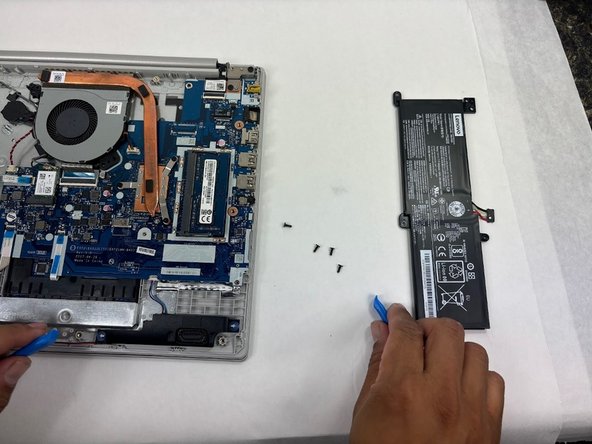
- Remove the three 6 mm screws from the tabs surrounding the battery using a Phillips #0 screwdriver.
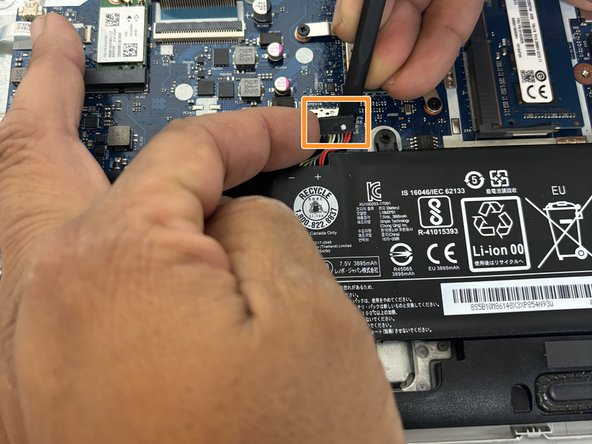
- Carefully separate the battery connector from the device using a spudger.
- Lift the battery up and remove it from the device.
- Remove the connector for the speakers from the motherboard using a spudger.
- Gently lift the speakers from the device using a spudger.
- Carefully lift the red wire from its dock along the bottom.
- Remove the speakers from the device.