Shark Clean Sense HP102PET LED Screen Replacements
ID: 179250
Description: The LED screen on this device allows you to...
Steps:
- Turn off and unplug the air purifier before beginning.
- Unscrew the one 1.2 cm screw holding the grate at the top with a TR10 Torx screwdriver.
- Use a prying tool to carefully pry along the outer edges to disengage the inner retaining clips.
- These retaining clips can be difficult to disengage, but releasing two clips on the same side should allow you to easily remove the grate.
- Remove the grate.
- Remove the two 1.2 cm screws with a TR10 Torx screwdriver.
- Almost all screws are the same length (around 1 cm). The main difference is the bit that's used to remove them.
- Use a Phillips #1 screwdriver to remove the four 1 cm screws.
- This will make the fan holder slightly loose, but this will not be a problem until you open the case completely.
- Flip the device over and unscrew the bottom by turning it clockwise.
- Remove the filter.
- Remove the five 1 cm a Phillips screwdriver.
- Unscrew the four 1.2 cm screws with a TR10 Torx screwdriver.
- The ring will not be hard to remove, but be careful on reassembly. Make sure that the power connector is properly seated when putting the ring back on.
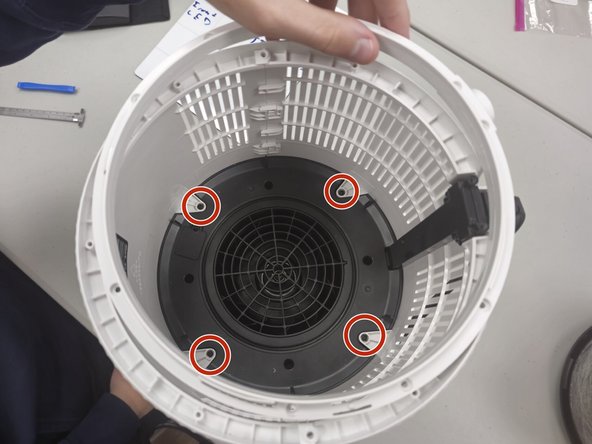
- Remove the four 1 cm screws that secure the fan housing.
- Make sure that you are pulling up on the side that allows, as pictured in the red box.
- Gently slide the cases up and down, or hold one and gently pull up on the opposite side (Down on the left, up on the right for this picture).
- The whole case will start to separate and the black disc will come loose. This is normal.
- Gently open the case outwards as there are fragile electronics inside.
- Remove the fan housing.
- Remove the single Phillips screw on top of the device.
- Lift up the plastic cover after removing the screw to replace the screen.
- Remove all four 1 cm Phillips screws.
- The hand in frame is hiding one of the screws; it's opposite of the back right screw.
- Grip and remove the LED panel.