Canon EOS Rebel T2i Main PCB Board Replacement
ID: 180582
Description: This guide shows you how to remove the main PCB...
Steps:
- Before beginning, ensure that the camera is off, and the battery is removed.
- Pry open the rubber I/F terminal cap with your finger.
- Remove the two M1.7x2.5mm JIS #000 screws that are underneath the I/F terminal cap.
- Using a plastic pick, or another thin plastic prying tool, pop off the I/F terminal cover from the camera.
- On the left side of the camera, remove the following screw:
- One M1.7x6.0mm JIS #000 screw
- On the right side, remove the following screws:
- One M1.7x5.5mm JIS #000 screw
- One M1.7x3.5mm JIS #000 screw
- Remove the battery door.
- Open the battery door to about a 35° angle.
- Pull the battery door straight outwards.
- Remove the following screws from the bottom of the camera:
- One M1.7x6.0mm JIS #000 screw
- Two M1.7x2.5mm JIS #000 screws
- One M1.7x5.5mm JIS #000 screw
- Slide the viewfinder eyepiece vertically upwards.
- Start to pull the back cover partially off of the camera.
- Use caution when removing the back cover, there is a ribbon cable that connects the LCD screen to the main PCB board.
- Disconnect the LCD screen ribbon cable from the main PCB board.
- Use a plastic spudger to lift up the black locking tab.
- Carefully pull out the ribbon cable from its connector using a pair of angled tweezers.
- Finish pulling the back cover off of the camera body.
- Remove the following screws from the front of the camera:
- Two M1.7x5.5mm JIS #000 screws
- On the bottom of the camera, remove the following screws:
- Three M1.7x5.5mm JIS #000 screws
- Slide a spudger tool towards the tripod mount, underneath the plastic cover.
- Push the plastic cover up and over the tripod mount.
- Pull the front cover off of the camera.
- Electric Shock Warning: With the front cover off, the high voltage capacitor on the DC PCB board is now exposed. It is recommended that you use a capacitor discharge tool to ensure the capacitor is fully discharged before proceeding further.
- Remove the screws next to the viewfinder:
- Two M1.7x2.5mm JIS #000 screws
- One M2.0x8.9mm JIS #000 diopter screw
- Remove the following screws from the top of the camera:
- One M1.7x2.5mm JIS #000 screw
- One M1.7x5.0mm Phillips #000 screw
- Disconnect the microphone cable from the main PCB board.
- Position a flathead 2.5mm screwdriver between the main PCB board connector and the microphone connector.
- Gently wiggle the flathead screwdriver back and forth until the microphone connector comes free.
- If you do not have a flathead 2.5mm screwdriver, another similarly sized flathead screwdriver should work.
- Locate the ribbon cable which connects the top cover the main PCB board.
- Use a plastic spudger tool to carefully pry off the connector.
- Use caution when handling ribbon connectors and their connectors.
- Take note of where this fiber optic cable connects to the main PCB board.
- The cable will slide out of the connector when you pull the top cover off. You will need to remember to slide this cable back into the connector with a pair of tweezers when reinstalling the top cover. This cable is crucial for the function of the camera flash.
- Disconnect these two cables connected to the DC PCB board.
- Use the same method as with removing the microphone cable, except with using a flathead 3.0mm screwdriver.
- Gently wiggle the flathead screwdriver back and forth until the connectors comes free.
- If you do not have a flathead 3.0mm screwdriver, another slightly larger flathead screwdriver should work.
- Gently lift the top cover up and off of the camera body, being careful that the loose cables do not snag on anything.
- Use caution while handling ribbon cables and ribbon cables connects to avoid damaging them.
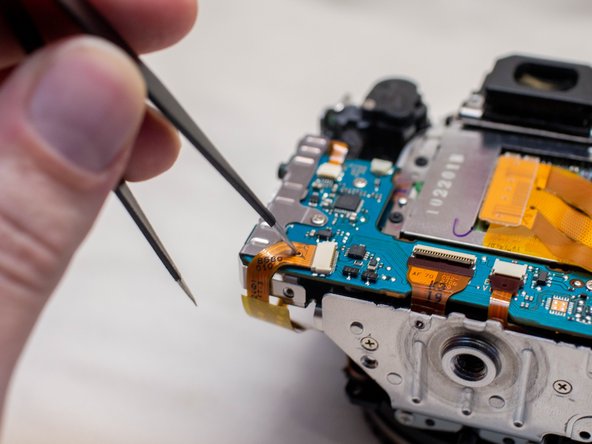
- Locate these three ribbon cables located on the left side of the main PCB board.
- Disconnect the ribbon cables.
- Two of these ribbon cables features a hole in them which can assist with disconnecting them. Use either a pair of tweezers or another tool with a thin point to pull out the ribbon cables utilizing this hole.
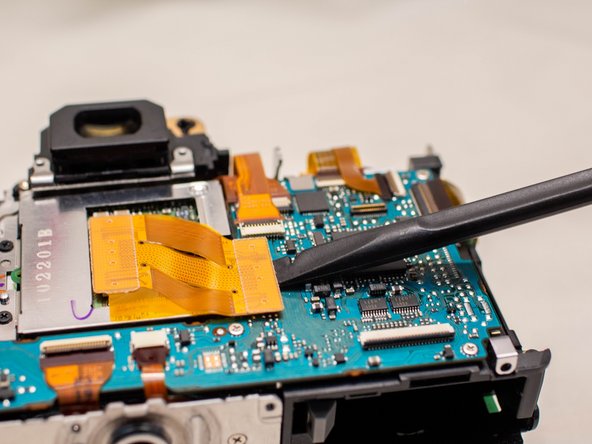
- Use a plastic spudger tool to carefully push up and disconnect the imaging sensor ribbon cable.
- Locate the remaining seven ribbon cables connected to the main PCB board.
- Gently push up on the plastic lock tabs to unlock each of the ribbon cable connectors. Be especially careful with the wide lock tab, as it is particularly fragile.
- Disconnect each ribbon cable from the main PCB board.
- iFixit connector guide
- Remove the following screws on the main PCB board:
- Three M1.7x2.5mm JIS #000 screws
- Two M1.7x3.5mm Phillips #000 screws
- Slide off the metal I/F terminal shield.
- Tilt the main PCB board upwards to reveal the remaining cable connection.
- Carefully disconnect the cable.