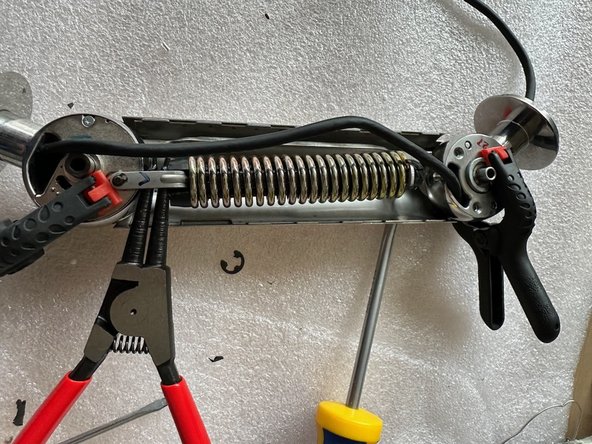
iMac G4 neck assembly (and getting the spring back in place)
ID: 181517
Description: Hi, I'll show how to (dis-)assemble an iMac G4...
Steps:
- To make it clear: You don't need to remove the neck from the monitor and stand. I did this as I totally replaced the actual computer with a Mac Mini and the old display with a recent mobile monitor and therefore replaced the cable in the neck. If you only want to get the spring back in place, you can keep it all together and only open up the neck.
- The special 'three hole' Apple screws can be opened with paper scissors (with sharp tips) or the snap ring plier (or both on both sides).
- Remove one side of the cover using the snap ring plier on the special Apple screw (and the paper scissors on the other side if required). Try to keep the other cover in place, but it's not a problem if it comes apart.
- Now put the snap ring plier into the space between the bottom part of the spring and the joint. By closing the plier you should be able to extend the spring so that the upper part of the joint can be locked in. You may want to secure the spring in place with a clamp.
- Using this procedure you should be able to bring a lose spring back in place. Good luck!