2004-2005 Honda Civic Climate control HALOGEN/LED light Repair Replacement
ID: 185190
Description: If you notice your climate control lights are...
Steps:
- Pull down on the silver collar to unlatch the shift boot.
- Unscrew the shifter knob and remove it.
- Lift the edge of the shifter boot and pull up the shifter housing.
- It may take a bit of force.
- Use a Phillips #1 screwdriver to remove the two 17 mm black screws near the cup holder.
- Pull along the sides of the center console to release the clips.
- Metal clips might fall, you can attach them when reassembling the center console.
- Unplug the cigarette port connector.
- If you have aftermarket parts those will also need to be unplugged but remember where the connections belong to.
- Use an 8 mm socket wrench or Phillips #2 screwdriver to remove two 8 mm screws from inside the center console and under the radio section.
- Use a trim removal tool to release the clips surrounding the head unit (radio housing).
- Open the radio unit from the top to reveal the cables behind it.
- Unplug each connector from the head unit.
- Unplug any connectors to aftermarket parts if needed.
- For helpful details on different types of connectors, take a look at this Recognizing and Disconnecting Cable Connectors guide.
- If you have an aftermarket radio note where all connections belong.
- Pull straight up on the climate control knobs to remove them.
- Each knob is uniquely shaped for its control, so it will only fit its original location.
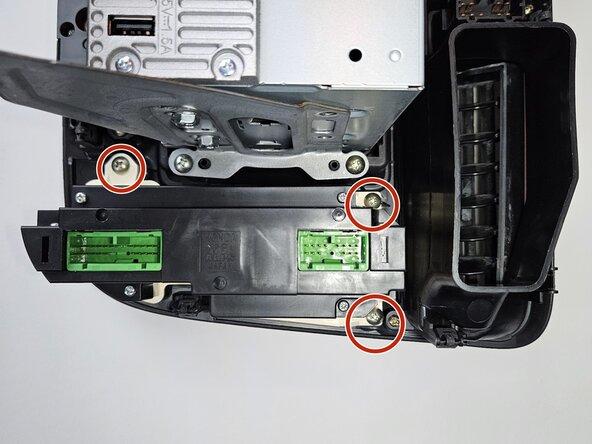
- Use a Phillips #2 screwdriver to remove three 17 mm screws securing the climate control module to the head unit.
- Remove the climate control module.
- Use tweezers or your fingers to twist and remove the two light bulbs from the side of the climate control module.
- Pull out the bulbs from the housing.
- Replace old light with new light.
- Halogen bulbs and LED bulbs use different housing but the process is the same.