Anker Soundcore Space One Battery Replacement
ID: 185331
Description: Are you experiencing frequent audio static or...
Steps:
- Flip over the device so you can see the Soundcore symbol on the back two ear pieces.
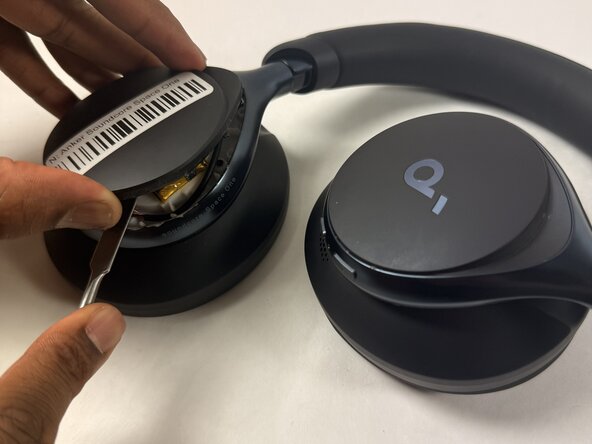
- Take a strong spudger (metal or plastic) and carefully insert it into the lining between the two back ear pieces.
- Using a metal spudger (like the one pictured) can cut you if not used correctly. Please be mindful of where you insert it if you choose to use one
- Removing the cover can take a couple of minutes. However, don't be aggressive while removing it, as you could damage the interior components under the back earpiece
- Carefully remove the cover to reveal the battery.
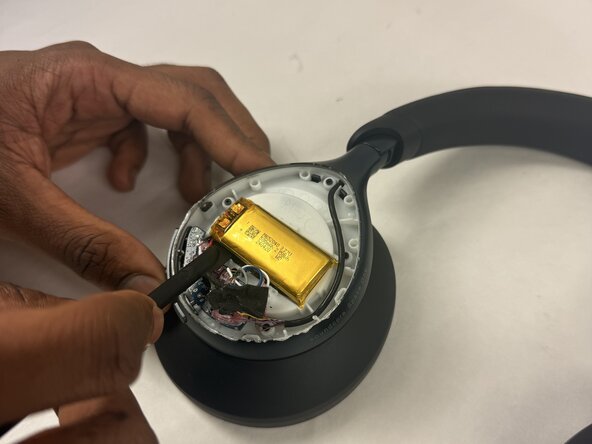
- Take a spudger and carefully lift the battery from the interior components.
- Take care not to warp, bend, or puncture the battery.
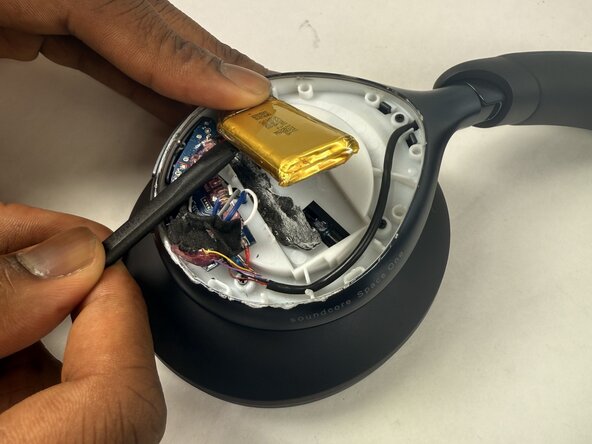
- The battery has a layer of adhesive under it. If necessary, use a hairdryer to lightly heat the battery to loosen the battery adhesive.
- Lift out the battery.
- Desolder the battery connections.