Anker Soundcore Space One Ear Pad Replacement
ID: 185332
Description: Do your headphones feel uncomfortable when you...
Steps:
- Flip over the device so the ear pads face up.
- This replacement guide will only cover one of the ear pads. The same exact steps apply to both.
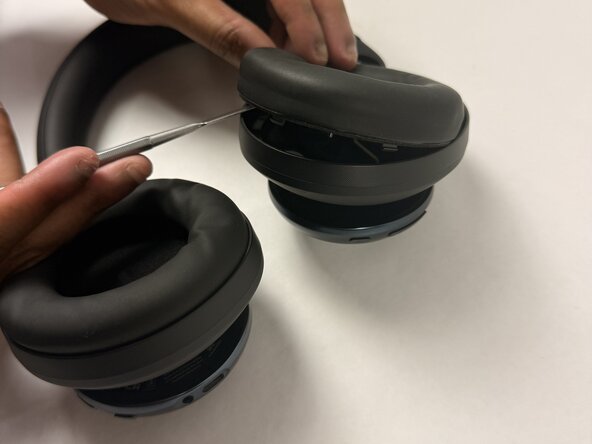
- Insert a spudger (plastic or metal) between the ear pad and the driver housing (the driver housing is the outside plastic part of ear cup).
- Using a metal spudger (like the one pictured) can cut you if not used correctly. Please be mindful of where you insert it if you choose to use one.
- Pry around the ear pad in a circular path until it fully releases.
- Remove the ear pad from the driver housing.
- The gray foam component shown is an additional protective component of the ear pad. You can remove it with your hands if needed, without any tools.