Asus TUF Gaming F15 FX506L Thermal Paste Replacement
ID: 192042
Description: Hello everyone, in this guide Ill be showing...
Steps:
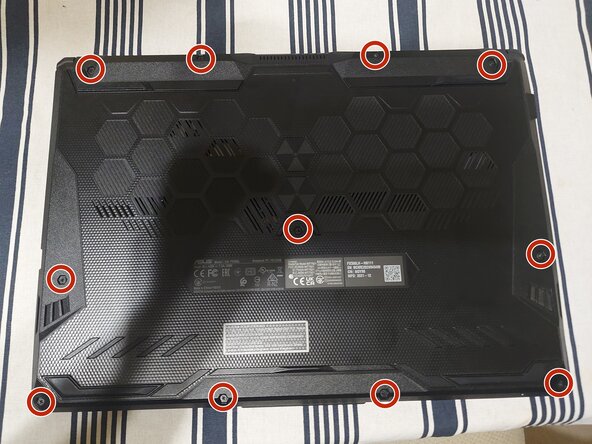
- Remove the screws that hold the back panel.
- Use a prying tool to release all the clips and remove the panel.
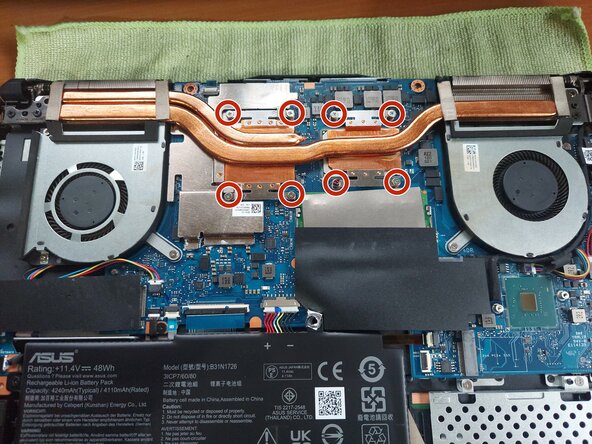
- Unscrew the heatsink.
- Clean the old thermal paste both from the cooler and the CPU. It is best to use isopropyl alcohol and cotton swabs or paper towel, but be careful not to go too hard on the CPU.
- It is also recommended to use compressed air to remove any dust in the laptop and the fans.
- Dont use too much thermal paste, just enough to cover some portion of the pad. If you have a spreader, use it. The thermal paste will apply evenly after you tighten the heatsink. Check the condition of the thermal pads and replace if necessary.
- Last, put the heatsink back carefully and tighten the screws in order to ensure even pressure.