Ecovacs T20 Omni Teardown
ID: 193948
Description: This guide describes the complete teardown of...
Steps:
- Remove all accessories from the robot. Top cover, dust bin, side brushes, main brush, and mopping pad
- Using a suitable tool (or a small flathead screwdriver), remove the two rubber covers near the Lidar tower.
- Remove the two screws.
- Unless you need to replace one of the parts of the Lidar tower, you do not need to remove the other two screws present.
- Flip the robot over
- Remove the six screws securing the battery cover and remove it.
- Remove the two screws securing the counterweight.
- Remove the counterweight.
- Remove the battery, making sure to properly disconnect the connector.
- When removing the battery, be careful not to strain the connector or deform or puncture the battery. A lithium-ion battery can catch fire or explode if damaged.
- Remove the 8 screws securing the lower bumper cover
- Remove the lower cover, taking care not to drop the front bumper.
- Disconnect the 3 sensor connectors on the bumper.
- Completely remove the bumper.
- Remove the 10 screws that hold the upper and lower case together
- Flip the robot over so that its wheels are facing down.
- Begin separating the top shell from the bottom shell just enough to access the connectors on the front side.
- Disconnect the four connectors and separate the top shell from the rest of the unit.
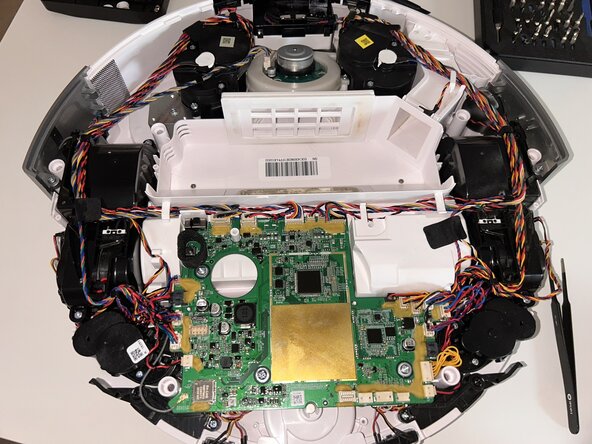
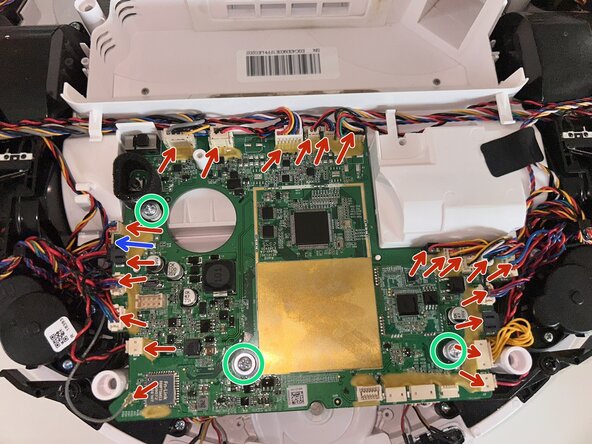
- Once you have reached the motherboard, disconnect all connectors on the top side.
- There is an additional connector on the bottom side, indicated by the blue arrow in the image.
- Remove the three screws securing the board to the case and remove the board.
- From this point, you can easily replace any component of the robot, such as the wheel motors, scrubbing pad motors, suction fan, side brush motors, and main brush motor.