How to Unclog a Carrier Puron Performance Series 24ACC6 Drain Line
ID: 194843
Description: If your air conditioning system automatically...
Steps:
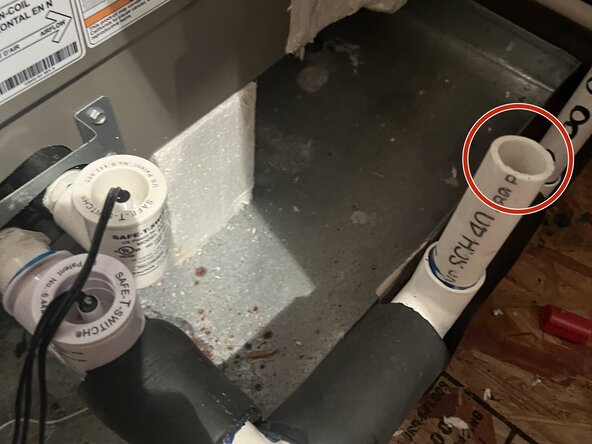
- Remove the condensation line float cover to check if there is a large amount of water.
- A lot of water indicates a clog.
- Turn on and run the faucet at the sink where the drain is connected to ensure that the sink isn't clogged.
- You can find the drain line by looking under each sink for the drain hose.
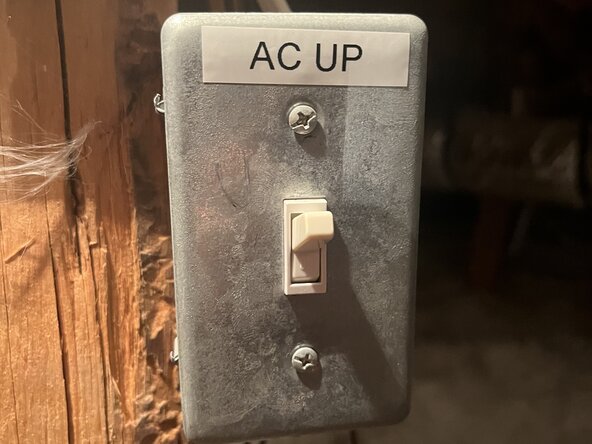
- Before you begin, turn off the AC at the thermostat and switch off the power to the AC unit for the drain you are unclogging.
- The power for the AC unit should automatically shut off if water is in the condensation line.
- Place a bucket under the sink.
- Use a flathead screwdriver to loosen the clamp securing the drain hose to the pipe.
- Do not fully remove the clamp—loosen it just enough so it can be moved.
- Slide the clamp up the drain hose to move it out of the way.
- Detach the hose from the pipe and position it over the bucket to catch any liquid or debris that comes out.
- Use a wire brush or plumber's snake to clean the hose thoroughly.
- If anything misses the bucket, use a towel to clean it up.
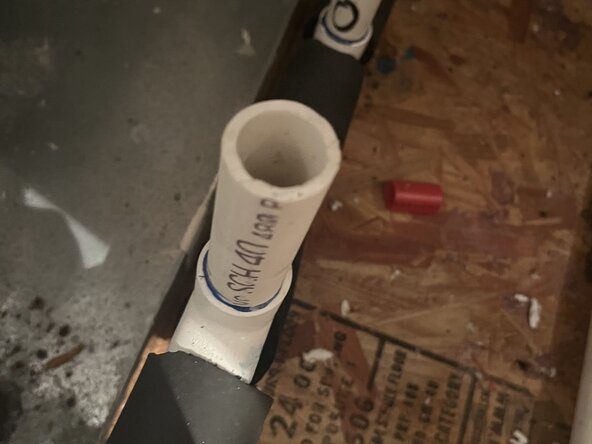
- Go to the drain line.
- It will be near the condensation floats.
- Pour a small amount of clean water into the drain line and observe whether it flows freely.
- Wiggle the hose onto the pipe connector and make sure it is fully connected
- Slide the clamp back down to where the hose connects to the pipe.
- Use a flathead screwdriver to tighten the screw and secure the clamp.
- Turn on the sink faucet to check for leaks.
- If present, check that the clamp is fully tightened and the hose is securely attached.
- Pour a cup of distilled vinegar down the drain line to remove any leftover residue from the clog.
- Turn the AC unit back on.
- If the clog is cleared, the AC unit should function normally again.