Lenovo IdeaPad 1-15IJL7 Motherboard Replacement
ID: 199155
Description: A motherboard is the most important part of the...
Steps:
- Using a T4 Torx screwdriver, remove the screws that secure the lower case:
- Six 2.5 mm screws
- Four 5 mm screws
- Insert a spudger into the seam between the lower case and chassis.
- Pry around the entire perimeter until the lower case fully releases.
- Unplug and remove the black and grey wires, and the I/O board ribbon cable from the Wi-Fi chip.
- Using Jimmy, remove the other ribbon cable from the I/O board
- Disconnect the battery and speaker connector from the motherboard.
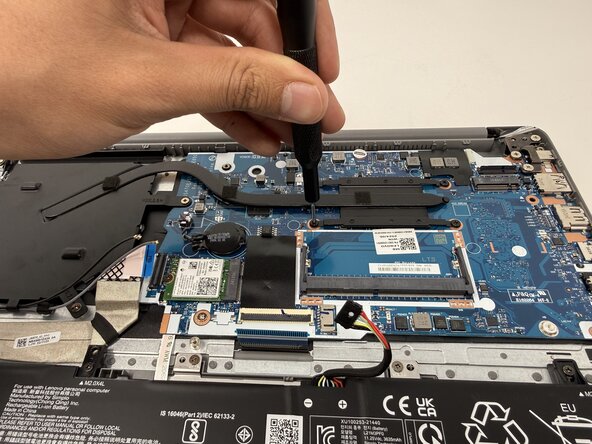
- Using a Phillips #00 screwdriver, remove seven 4 mm screws from the cooling assembly.
- Carefully lift the cooling assembly off of the motherboard.
- Using a Phillips #00 screwdriver, remove the 2mm screw that secures the Wi-Fi module.
- Lift the Wi-Fi module from its position.
- Using a Phillips #00 screwdriver, remove the six 4mm screws that secure the battery.
- Lift the battery from its position.
- Using your fingers, gently disconnect the touchpad ribbon cable connector
- Using the Phillips #00 screwdriver, remove the three 2mm screws that secure the motherboard.
- One of the 2mm screws might be under a sticker; remove the sticker to proceed.
- Using the Phillips #00 screwdriver, remove the three 4mm screws from the hinge.
- Make sure to lift the hinge in order to take out the motherboard.
- Using your fingers, gently disconnect the display cable.
- Lift the motherboard out of the laptop.