Alcatel Go Flip 4 Keypad Replacement
ID: 199726
Description: Use this guide to replace the keypad to the...
Steps:
- Insert a spudger into the notch on the back cover and gently pry upward until you hear a soft click, indicating the back has begun to separate.
- Continue prying around the edges until the cover is fully removed.
- Insert a spudger into the midframe cutout and pry up to release the battery.
- Remove the battery.
- Use a JIS #00 screwdriver to remove all nine 4.4 mm screws that secure the midframe.
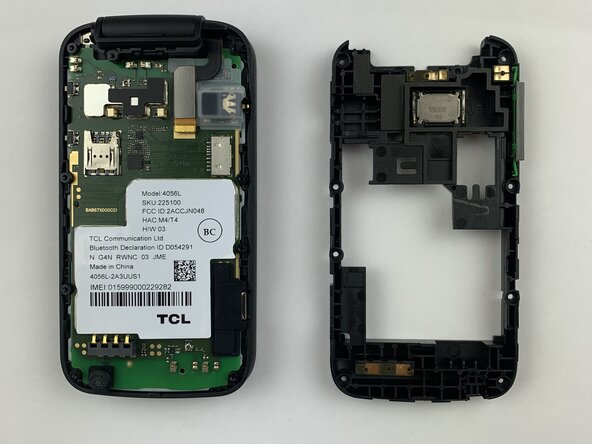
- Run the spudger under the midframe to pry it away from the rest of the phone.
- Be very careful when removing the midframe as too much strain can cause it to snap.
- Set the midframe aside.
- Disconnect the ray bone connection.
- Lift the silicon charging port cover.
- Pry up the motherboard with the spudger.
- Run the spudger along the perimeter of the motherboard.
- Remove the motherboard from the phone.
- Using the spudger, peel off the keypad.
- Remove the keypad from the phone.