Pulsar Chronograph 100M (VD53-X220) Battery Replacement
ID: 199727
Description: Given enough time, watch batteries naturally...
Steps:
- Place the watch on the adjustable watch case holder tool.
- Adjust the holder tool until the watch is held firmly and remains stable.
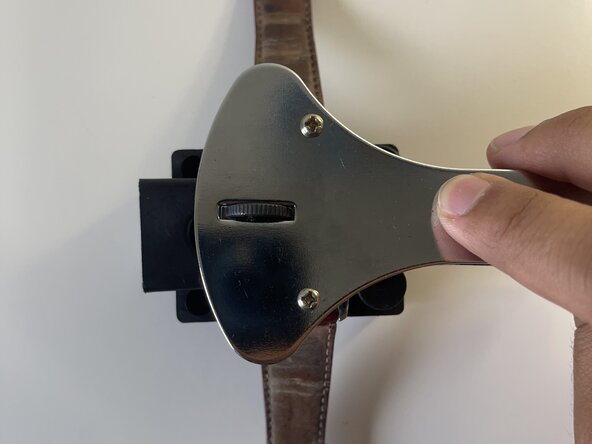
- Align the three points of the Jaxa wrench with three corresponding notches on the watch.
- Any three notches on the watch will work as long as they are aligned correctly.
- Ensure the three points are positioned correctly before turning to avoid scratches.
- Gently turn the wrench counterclockwise until you feel the watch casing start to loosen up.
- Once loose, complete the process with your hands.
- Now that the watch interior is exposed, carefully lift the white plastic lid with a pair of tweezers.
- With your tweezers in hand, gently push the battery from its right side.
- Once displaced, you will be able to safely extract it from its contacts.
- Carefully slide the new battery into place.
- Lightly tap the top of the battery to ensure it's securely fastened.
- Align the plastic lid above the open watch and firmly snap it back into position.
- You may use the watch's crown as a guide to easily align the lid.
- Place the watch's casing back over the interior and turn it clockwise.
- Align the Jaxa wrench's three points with three corresponding notches on the watch case.
- Any three notches will work, just be sure to have them correctly aligned.
- Turn the wrench clockwise to reseal the case.