Lenovo ThinkPad A285 Screen Replacement
ID: 199917
Description: This guide will show you how to properly and...
Steps:
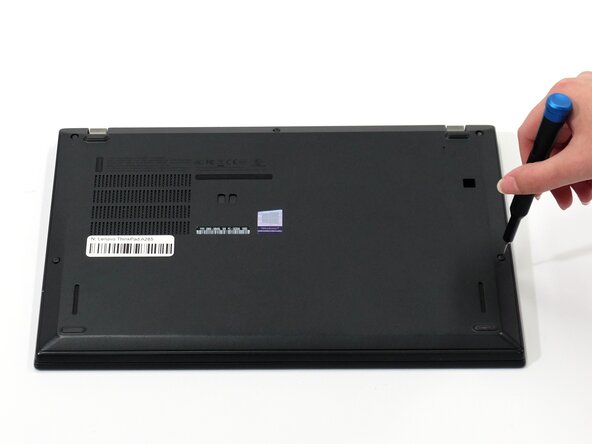
- Flip your laptop over so the bottom panel is facing up.
- Use a Phillips #0 to loosen the five screws holding the back panel to the laptop.
- These screws do not come all the way out, so loosen until free spinning.
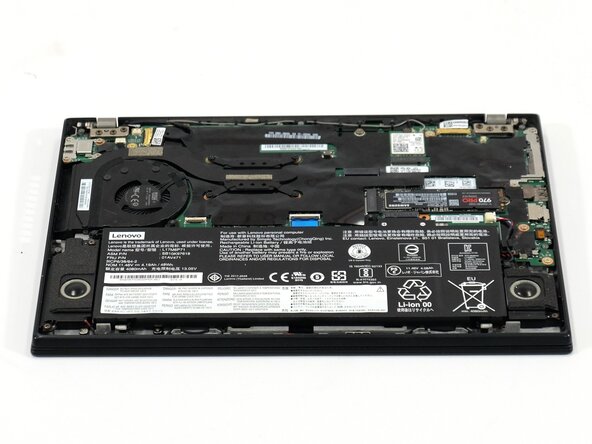
- Lift the bottom of the panel to separate the back panel away from the device.
- Remove the back panel.
- Use a pair of tweezers to gently disconnect the two Wi-Fi card antenna connectors.
- Make sure to pull the connectors straight up as to not bend them.
- Carefully unseat the cables from the retaining hooks.
- Use a Phillips #0 screwdriver to remove the six screws securing each of the hinges.
- Lift the hinges perpendicular to the motherboard.
- Use a spudger to release the locking bar on each of the two connectors.
- Disconnect both of the connectors.
- Carefully unseat the wires from their retaining hooks to completely separate the two halves of the laptop.
- Carefully lift the top half off of the bottom half, this may be a bit tricky but make sure to be careful every step of the way as you weave the hinges up and out of the bottom half of the laptop.
- With the halves separated, lift the now separate screen part of the laptop up and use an opening tool to release the retaining clips that secure the screen to the bezel.
- Slowly and carefully work your spudger around the edges of the screen, carefully forcing the two halves of the screen apart as you work your way along. There should be around 20 connectors in total for you to separate.
- Release the locking bar on the connector.
- Disconnect the connector.
- Remove the screen.