Dell Latitude E5520 Heat Sink Replacement
ID: 200048
Description: If your Dell Latitude E5520 is constantly...
Steps:
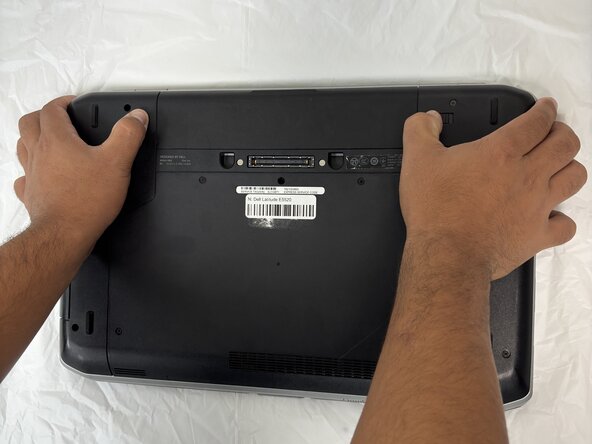
- Flip over the laptop to see the bottom view of the laptop.
- You will find two push clips near the top edge on the bottom side of the laptop.
- Place fingers on each of these clips at the same time.
- Push the two clips outward with pressure at the same time and pull up on the battery.
- The battery will be released to safely remove the part.
- Remove all five 2.5x5 screws that secure the lower case with a Phillips screwdriver.
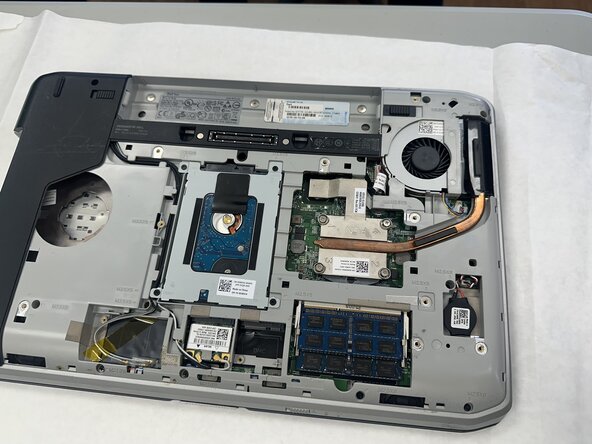
- Lift the back panel and set it aside.
- Remove all three 2.5x5 screws with a Phillips screwdriver.
- Remove one 2.5x8 screw with a Phillips screwdriver.
- Lift the right side back panel and set it aside.
- Loosen the four 2.5x8 Phillips screws securing the heat sink.
- The four screws are captive and will not come all the way off, so loosen them until you can remove the heat sink.
- Gently lift the heat sink out.