Razer Naga V2 HyperSpeed Scroll Wheel Replacement
ID: 200165
Description: In this guide, we will show you how to safely r...
Steps:
- Take off the magnetic top and remove the dongle.
- Heat the mouse feet with an iOpener or hairdryer.
- Use an opening tool or pick to remove the mouse feet.
- Reapply adhesive to the feet before reinstallation if you're reusing them.
- Use a TR6 Torx screwdriver to remove the four screws on the underside of the mouse.
- Flip the Razer mouse back over to the top side. Using the iFixit opening tool to slowly take the top shell off, and the right shell should fall off as well.
- When taking the top shell off (middle shell), use precision tweezers to disconnect the battery compartment connector.
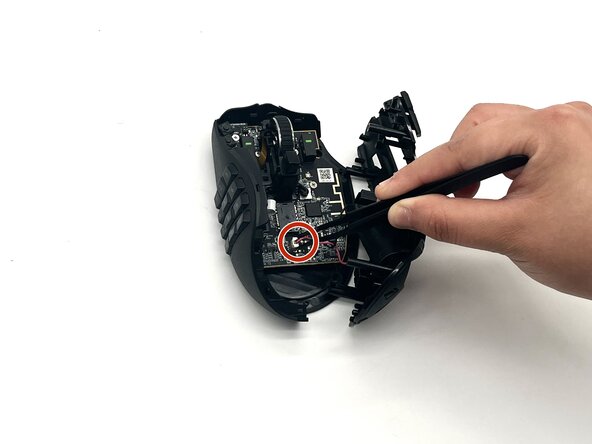
- Disconnect the Left shell and carefully remove the white connector with tweezers.
- Disconnect the brown ribbon cable that’s connected to the scroll wheel with precision tweezers (dull).
- Use the iFixit Opening tool on the clip near the front of the mouse to release and remove the scroll wheel.
- Widen the sides of the scroll wheel brackets that holds the scroll wheel using the iFixit Opening tool (you may need to use a little bit of force to widen the other side) and remove the scroll wheel.