Garmin Drive 50 LM Speaker Replacement
ID: 200265
Description: If you may have recently been struggling with...
Steps:
- Use a T5 Torx screwdriver to remove the four 9 mm-long screws securing the case.
- Insert an opening tool into the seam between the case and the chassis.
- Pry around the perimeter of the device until the case releases.
- It is recommended to work along the length of the device first, then the width.
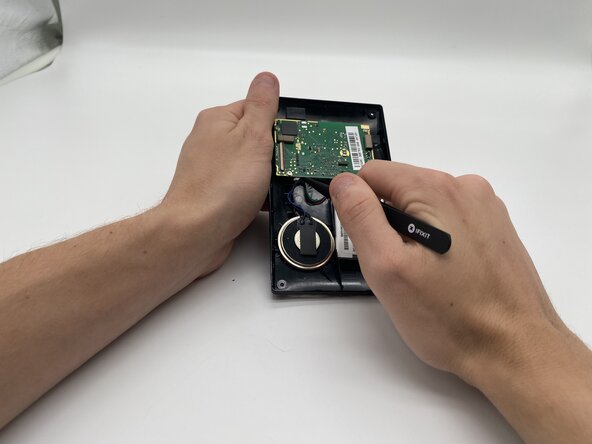
- Once open, set the screen down at an offset to be able to see the yellow cable.
- With tweezers, flip up the brown locking flap to release the ribbon cable.
- Gently disconnect the yellow ribbon cable.
- Gently pull on the blue cord on the left of the motherboard with your tweezers until it is disconnected.
- Once the speaker is disconnected, gently pull on the speaker until it comes out of the case.
- The speaker will be connected to the case via adhesive, so it could be sticky if touched.