Lenovo V15-IIL 82C5 HDD Replacement
ID: 200333
Description: This guide will show you how to properly...
Steps:
- Power off your laptop and disconnect the charger and peripheries before beginning.
- Flip the laptop over so that the lower case is facing up.
- Remove the following Phillips #1 screws:
- Six 7 mm-long
- Four 4 mm-long
- Insert an opening pick into the seam between the lower case and chassis.
- Slide the opening pick around the entire perimeter until all of the retaining clips are fully released.
- Lift and remove the lower case.
- Use your fingernails to "walk" the battery connector out of its socket.
- Remove the three 6 mm-long Phillips screws securing the battery.
- Lift the battery up and out of the chassis.
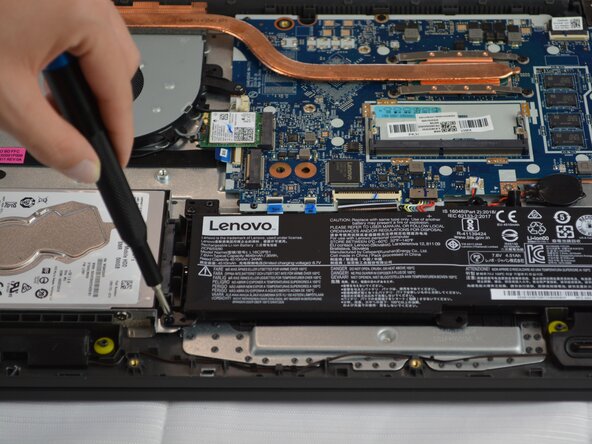
- Remove the two 6 mm-long Phillips screws securing the HDD.
- Disconnect the HDD connection.
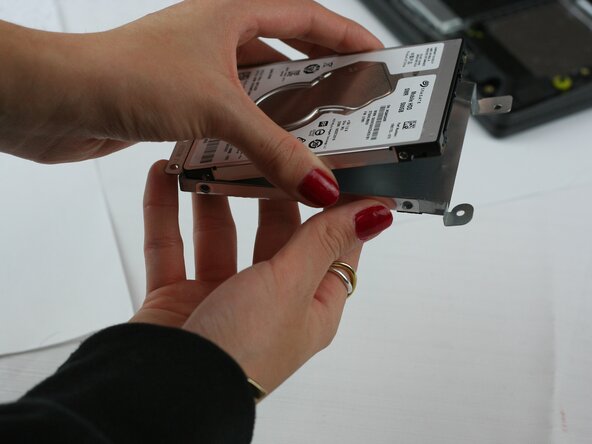
- Remove the four 6 mm-long Phillips screws securing the HDD to its housing.
- Remove the HDD.