iPhone 17 Pro Max Taptic Engine Installation
ID: 206248
Description:
Steps:
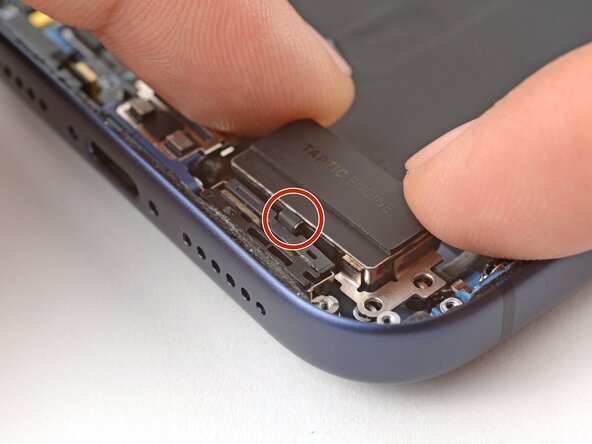
- Place the Taptic Engine upside down on the edge of the iPhone frame.
- While holding the Taptic Engine with one hand, use your finger to press and connect the Taptic Engine press connector.
- Flip the Taptic Engine over the frame and align it using its screw holes.
- The Taptic Engine flex cable should fold neatly between the Taptic Engine and the frame.
- Use a standoff screwdriver to install the two 4.0 mm‑long Taptic Engine screws.
- Use your fingers or a spudger to fold the flex antenna down in place.
- Use a JIS 00 screwdriver to install the three flex antenna screws:
- One 1.7 mm‑long screw
- Two 1.9 mm‑long screws
- Use tweezers to carefully place the ground clip in place.
- Be sure to orient this clip correctly as shown in the images.
- Use a JIS 00 screwdriver to install the two 1.9 mm‑long ground clip screws.