Asus G531G Battery Replacement
ID: 212102
Description: Shut down your device. Also, ensure it is...
Steps:
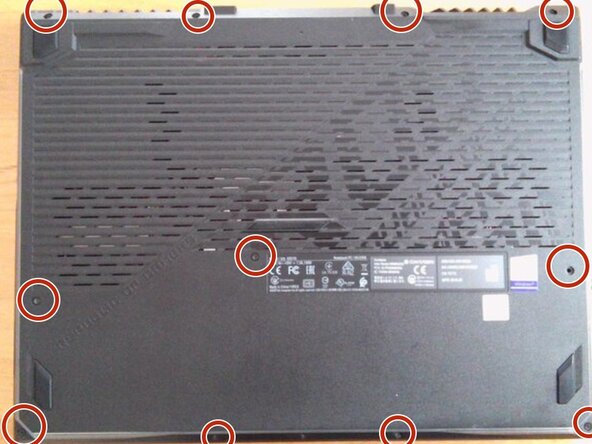
- Remove all the screws on the bottom.
- Remove the top left screw.
- If possible, please insert a pick.
- Remove the left claw.
- Remove the top right claw.
- Remove the claw on the right side
- Remove the lower claw.
- Grab the side with the HDMI port and other ports and open the cover. Please refer to the image.
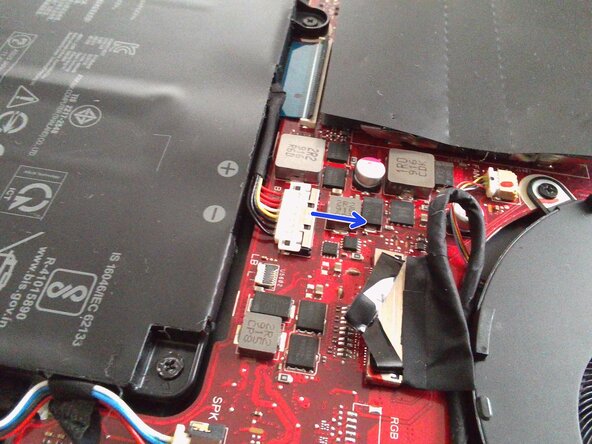
- Remove the pin.
- Move the silver part of the pin in the direction of the arrow.
- At this time, do not pull any further if you feel resistance, as moving it too far will break the pin.
- Perform the removal of the white part of the cable.
- Unscrew the battery.
- The image shows one screw already removed, but that was just because I forgot to take the photo earlier ;)
- Remove the battery.
- There is a risk of fire if the battery is bent or punctured. Handle with care.
- Dispose of the removed battery in accordance with local regulations.