NuPhy Halo 65 Battery Replacement
ID: 212245
Description: If your NuPhy Halo 65 is not turning on, it's...
Steps:
- Use a keycap puller to remove the cap covering the switch you want to replace.
- Latch the switch puller onto the switch, and squeeze lightly for grip.
- Make sure to apply the puller to the top and bottom edges of the switch.
- Once secure, pull to remove the switch.
- During reassembly, don't press too hard on the switch, as this will cause the pins to bend. To fix bent pins, simply grab a pair of small tweezers or pliers and bend them straight, then repeat the process more gently.
- Remove eleven 6.8 mm Phillips #000 screws.
- Using a plastic pry tool, gently separate the aluminum top frame from the bottom base.
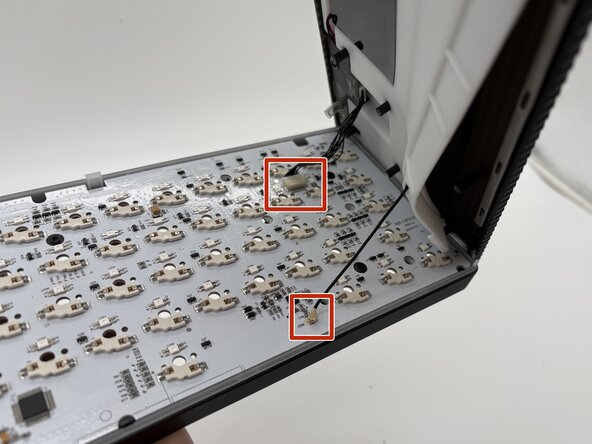
- Unplug both connectors attaching the bottom case to the PCB.
- Remove the two 7.5mm Phillips #2 screws.
- Remove the battery.