BLU S91 Pro Phone Battery Replacement
ID: 212320
Description: Replacing the Blu S91 Pro battery is an...
Steps:
- Long-press the power button to switch off the phone.
- Make sure to discharge the battery to at least below 25% to prevent the risk of a fire or explosion from a punctured lithium battery.
- Use the heat gun around the perimeter of the phone to loosen the adhesive under the cover.
- Use a pry tool to lift the cover from the edges.
- This process might take a while due to the strong adhesive used.
- Avoid keeping the heat gun in one place for a long time to prevent damaging the cover.
- Slide the SIM slot out of the phone.
- Push the bracket around the phone to the left, then upwards to remove it.
- Exercise caution when removing the bracket around the phone to prevent it from breaking.
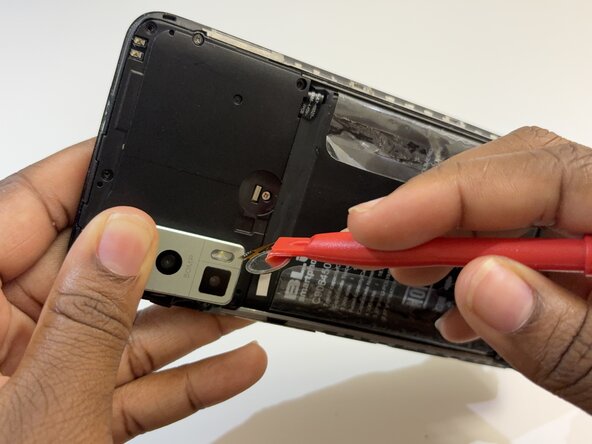
- Use the pry tool to carefully lift the fingerprint sensor and expose the screw underneath.
- Remove all seven 8 mm screws on the upper side of the phone using a Phillips #000 screwdriver to reveal the battery connector.
- Lift the fingerprint sensor to disconnect it from the phone.
- Lift the battery connector to disconnect it from the phone
- Pull on the tabs on the battery to remove it.
- You might need to apply gentle heat to loosen the adhesive.
- Avoid excessive heat as this might lead to overheating and explosion.
- Install the new battery.
- Be careful with the fingerprint sensor: it’s located above the cover, while its connector is positioned underneath it.