ASUS Chromebook CXB170CKA-BCL64N6 Battery Replacement
ID: 212644
Description: Your ASUS Chromebook (Model CXB170CKA-BCL64N6)...
Steps:
- Flip the device over to have the back panel facing towards you.
- Remove eleven 7.2mm screws from the back panel using a Phillips #00 screwdriver.
- Place an opening tool between the back panel and seam of the mainframe.
- Gently insert the opening tool into the seam and slide it around the entire frame until the back panel releases.
- Remove the back panel and set it to the side.
- Gently disconnect the connector from the battery.
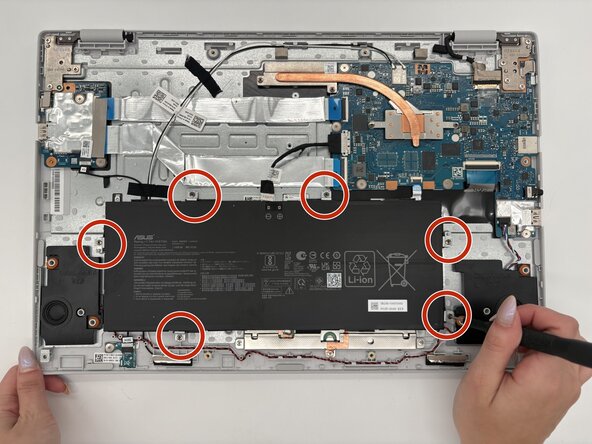
- Remove six 3.6mm screws from the battery with a Phillips #00 screwdriver.
- Remove the battery.
- If the battery is cut or swollen, put on gloves before handling the part further, and dispose of it properly.