ASUS TUF GAMING X570-PLUS Motherboard CMOS Battery Replacement
ID: 213190
Description: Replacing the battery on a ASUS X570-PLUS...
Steps:
- Power off and unplug your PC.
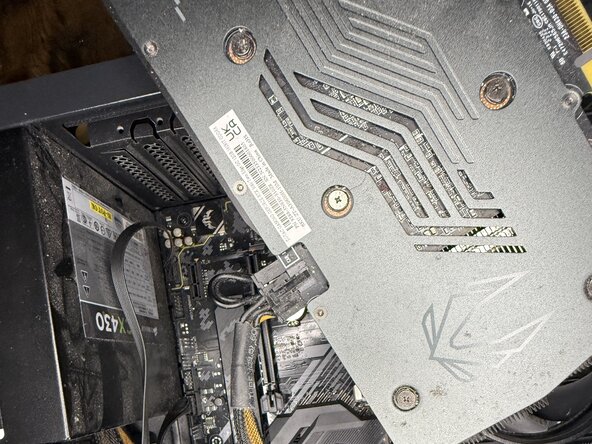
- Push down on the clamp and remove the graphics card and set aside.
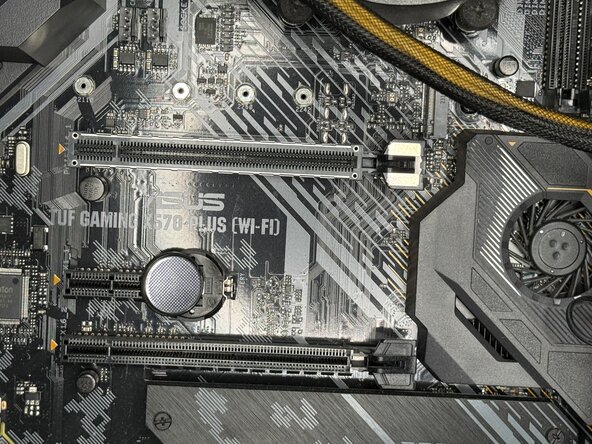
- Most CMOS batteries in PC's are under the graphics card on most motherboards.
- Push the silver pin down.
- The battery should spring up.
- If you're having trouble removing it by hand, use a plastic spudger to lift the edge of the battery and then remove it.
- Insert the new CR2032 battery into the holder.
- Push it down to lock it into place.
- Reinstall the graphics card.
- Make sure to hear click when reinstalling the graphics card.
- Reconnect the power cable to the PC, then turn it on.
- Push your power cable in before turning on.
- The boot option should pop up.
- Click F1 to run.
- Push the F1 key and press "OK" to enter your lock screen.
- You should be set after that and have a working PC.