How to Separate the Front and Back Cover of the Lenovo IdeaPad Duet 3 10IGL5
ID: 213612
Description: Follow this prerequisite guide to open and...
Steps:
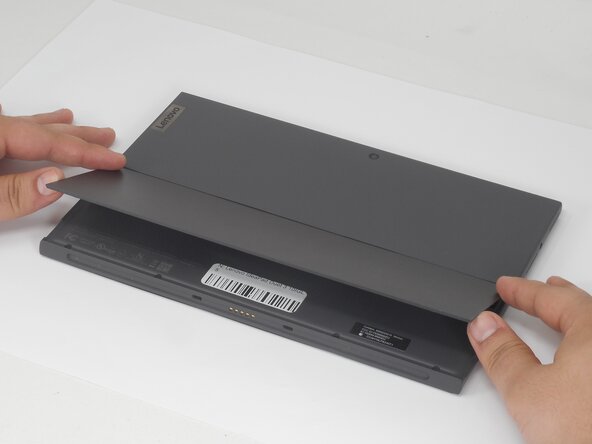
- Lift the kickstand to reveal the back cover screws.
- Use a T5 Torx screwdriver to remove the six 4.5 mm screws from the lower part of the bottom cover.
- With the iFixit opening pick, create space in a corner between the screen and the back panel. Slide the pick down the sides to release the clips holding them together.
- Slip your fingers in the space to carefully pry the two panels apart.
- You will hear several soft popping noises as you lift the screen.
- From the space created in the corner, carefully lift up the screen.
- This action will take moderate force, and there will be several soft popping noises. When opening, mind the connector that will keep you from folding the screen back more than 90 degrees.
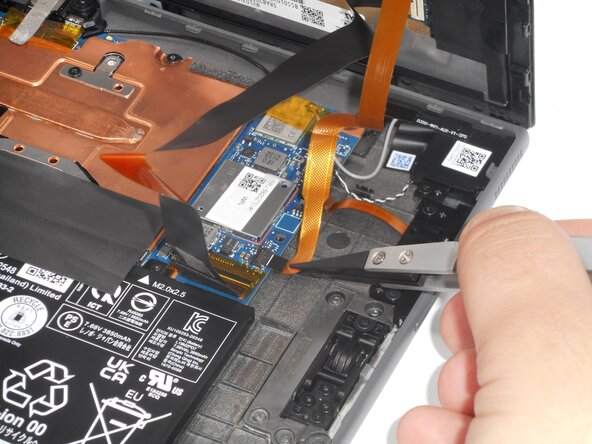
- On the motherboard, use an iFixit opening tool to flip up the locking flap on the ZIF connector.
- Use tweezers or your fingers to gently pull the cable out of its socket on the motherboard.
- Leave the larger EDP connector as is.
- When locking the ribbon cable back in the port, the thin white strip should be flush against the edge of the lock.
- Lay the device open on a flat surface.
- At this point, the large ribbon cable, the EDP, is the only thing connecting the two halves of the device.