Dell Latitude 5491 Thermal Paste Replacement
ID: 220735
Description: This guide will show you how to open the laptop...
Steps:
- Unscrew all screws holding the back panel in place.
- Use a prying tool to remove the back panel.
- Unscrew the 4 screws holding the CPU heatsink.
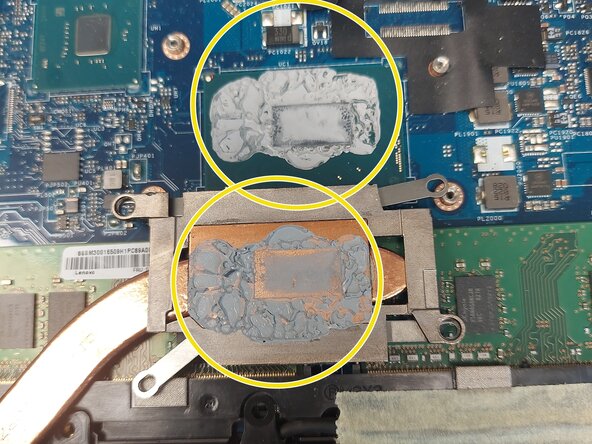
- Clean the old thermal paste from both the cooler and the CPU.
- Use isopropyl alcohol and cotton swabs or paper towel, but be careful not to press too hard on the CPU.
- It's also recommended to use compressed air to remove any dust in the laptop and the fan.
- Use only enough thermal paste to cover a portion of the pad. Use a spreader if you have one.
- The thermal paste will apply evenly after you tighten the heatsink.
- Place the heatsink back into the unit carefully and tighten the screws in an "X" pattern to ensure even pressure.
- Once you have the back cover opened, it is a good opportunity to upgrade the SSD and RAM.