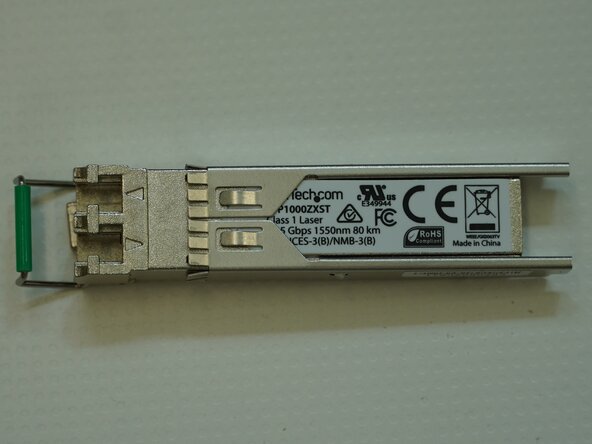
StarTech.com SFP1000ZXST 1000BASE-ZX SFP Transceiver Teardown
ID: 220833
Description: The StarTech.com SFP1000ZXST is a 1000BASE-ZX...
Steps:
- Verify that the module is a StarTech.com SFP1000ZXST 1000BASE-ZX SFP transceiver before proceeding.
- Locate the recessed retaining tabs on each side of the module and carefully lift them using a small flat-blade screwdriver.
- Now unfold the metal tab on the left side.
- Release the metal retaining pin by pulling the lever of the SFP module so that it clears the casing.
- Flip the SFP module back over and carefully slide back the casing.
- Carefully flip the SFP module back over making sure that the lever mechanism is not lost.
- Make sure you keep it somewhere safe.
- Using a PH00 bit, unscrew the 4.3mm centre retaining screw.
- Make sure to keep it safe.
- Using a flathead bit, gently lever the TOSA/ROSA retaining clip.
- It should come out very easily.
- Make sure not to lose this small part.
- Now we can safely remove the PCB from the casing and take a closer look.
- Make sure not to lose casing.
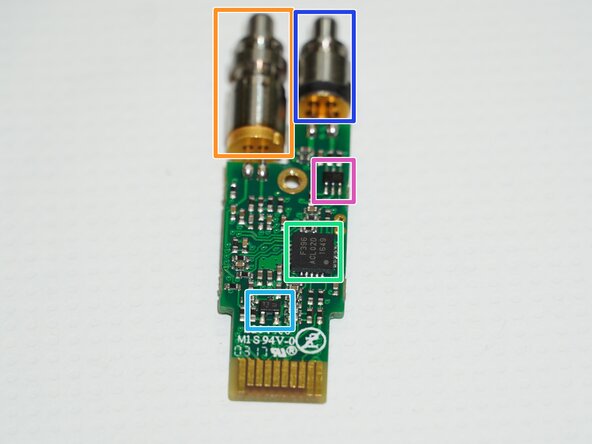
- ROSA
- TOSA
- MindSpeed M02095G-12 Gigabit Ethernet Laser Driver and Transceiver IC
- Unknown chip most likely power control, optical power monitor conditioning, signal-detect support, or protection
- Unknown chip most likely the SFP module controller/DDM IC
- Unknown chip most likely a temperature compensation transistor