Razer Blade 14 2022 Teardown
ID: 239413
Description: This is a Teardown of a Razer Blade 14 2022...
Steps:
- Make Sure the laptop is turned off, shutdown and unplugged from power or anything else plugged in to the laptop
- Remove the 10 Philips #1 Screws holding the bottom of the laptop.
- Lift the bottom cover off.
- Remove the 2 Philips #0 Screws holding the battery connector
- Remove the battery connector
- Remove 1 Philips #1 screw to Remove the SSD
- Remove the SSD
- Remove the 2 Wires Connected to the Wi-Fi Card
- Remove the 1 Phillips #1 Screw Holding the Wi-Fi Card in Place.
- Remove the Wi-Fi Card
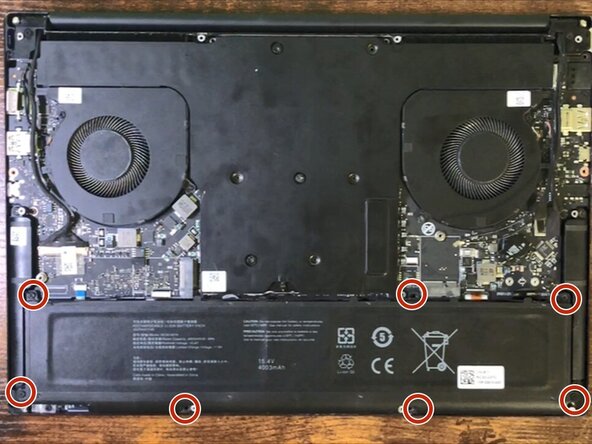
- Remove the 7 Philips #1 Screws holding in the battery.
- Remove the Battery
- Make Sure to not hit the battery connector in anything
- Remove this Sticker
- Remove All of these connectors from the board
- Remove 4 Philips #1 Screws to remove the Bluetooth antennas
- Pull out the 2 Bluetooth Antennas Together
- Remove the cable connecting the fans to the main board
- Remove 4 Phillips #1 Screws to remove the fans.
- Lift out the fans
- Remove 11 Phillips #1 Screws to remove the Main Board
- Remove 7 Phillips #1 Screws to remove the heat-sync
- Wiggle than lift the heat-sync off the Main Board
- You mat need to use a spudger to remove the Heat-sync
- You Now have a fully striped-down Razer Blade 14 (2022)
- Ryzen 9 6900 HX with Radeon Graphic
- Nvidia 3070 Ti