Visual Land Prestige Pro 7D Speaker Replacement
ID: 31684
Description: Use this guide if the speaker is broken....
Steps:
- Unscrew the two 4.0mm Phillips head screws found near the ports at the bottom of the device using a PH #00 screwdriver.
- Be careful when taking the back panel off. The speaker is connected to both the front and back panels, and may get pulled out if you are not gentle when lifting the back panel away.
- Slide the plastic prying tool in between the front and back panel and pry them apart on all 4 sides.
- It may be easiest to start on one of the sides, and work your way around the device. The bottom, with the ports, is the most difficult side and can be saved for last.
- There are small latches that make this difficult. Moderate force may be required to separate the two panels.
- Gently lift the speaker off of the back panel.
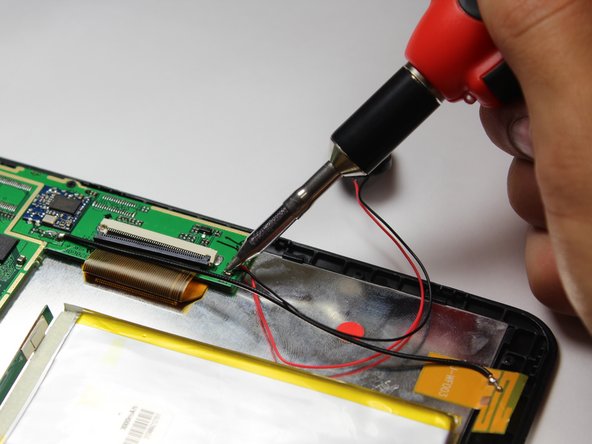
- Soldering guns are hot and can easily damage the device.
- Desolder the two connection points at the black and red wires.
- A helpful guide for desoldering can be found here How To Solder and Desolder Connections.