Nikon Coolpix S6800 Midframe Replacement
ID: 40678
Description: Use this guide to replace the midframe on your...
Steps:
- Turn the camera upside down and locate the two, black screws.
- Using the Philips #00 Screwdriver, remove each screw.
- Rotate the camera to the left side and remove the two, black, #00 Philips screws.
- Rotate the camera to the right side and remove the two, black, #00 Philips screws.
- The last screw that you remove will catch as the cover is trying to pop off. Try to keep the cover in place to allow for the screw to just fall out. Once you remove the screws, be careful not to lose the screws for reassembly.
- Carefully remove the back plate from the body of the camera.
- All of the external screws are black with rounded heads.
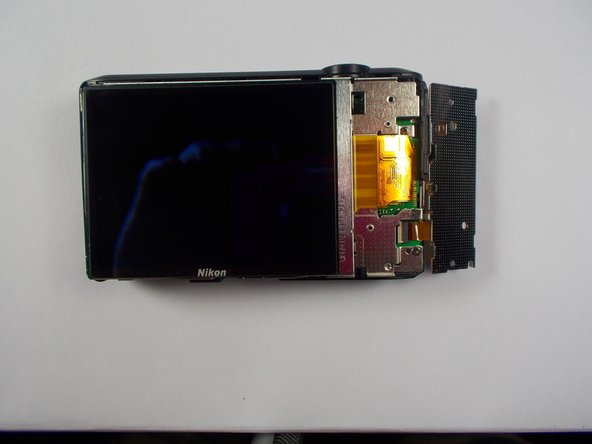
- Using the Philips #00 Screwdriver, remove the two screws that are holding the keypad.
- Flip the keypad away from the camera
- Be careful with the electric ribbon. Do not crease it or tug on it. Gently flip it away from the camera.
- Gently pull the display away from the camera body.
- Fold the display away from the camera
- Be careful with the electric ribbon. Do not crease it or tug on it. Gently flip it away from the camera.
- Be careful with the display. Do not press on it or drop it.
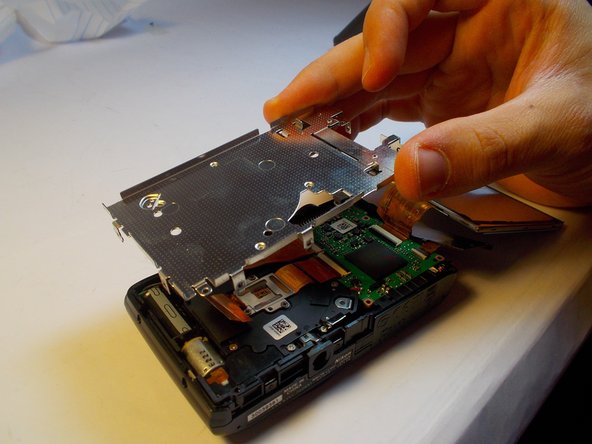
- Remove the visible midframe screws.
- There is a screw beneath the foam square that must be removed as well.
- The screw holding the silver wrist-strap loop on the side of the camera must also be removed.
- Gently lift the midframe up and out of the device.
- Be careful moving the midframe away from the ribbons don't force it, gently slide the plate away from the ribbons.