Canon Vixia HF S10 Camcorder Audio Replacement
ID: 40956
Description: If you're experiencing issues with the audio on...
Steps:
- Turn the camcorder upside down and remove the three 3x4 mm Phillips screws securing the black plastic case.
- Flip open the LCD screen.
- Remove the three 3x4 mm Phillips screws securing the black panel plastic case.
- From the inner corner in between the panel and the LCD screen, remove the two 2x2.5 mm Phillips screws and the 3x4 mm Phillips screw.
- Remove the black plastic covering with your fingers. Underneath the covering, you will find a screw hinge.
- Remove the 2x2.25 mm Phillips screw located at the top of the screw hinge.
- Using your fingers, remove the panel from the base of the camcorder.
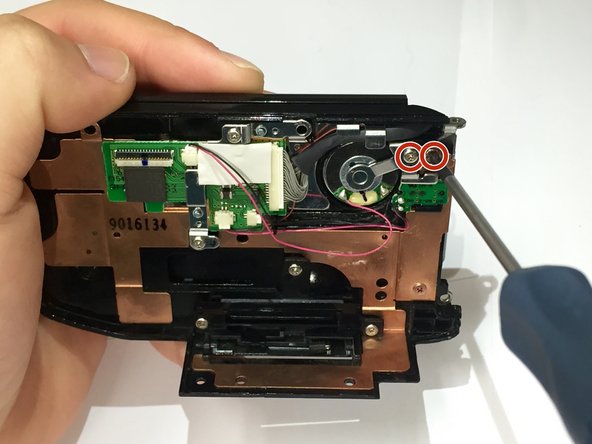
- After removing the panel, remove the two 2x2.25 mm Phillips screws located at the top right of the inside of the panel.
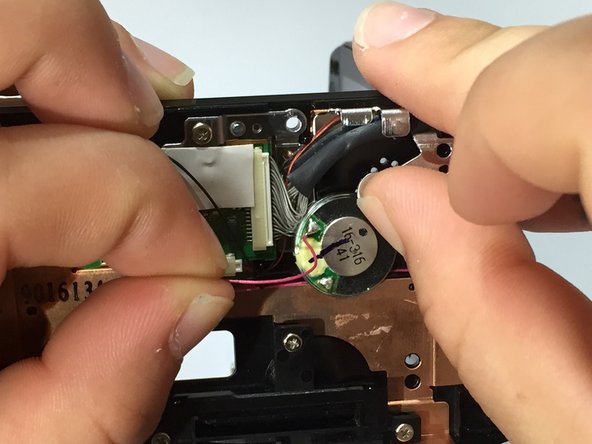
- Using one hand, gently move the silver piece holding the speaker down while using the other hand to remove the speaker.