Galaxy Tab S 10.5 Battery Replacement
ID: 50302
Description: This guide will give step by step instructions...
Steps:
- Place the plastic opening tool into the SD card slot or charge port.
- Try in an upward motion until you see a separation between the tablet and back cover.
- Work around the entire device by sliding the plastic opening tool around the rim.
- If this is the first time, it will be hard to separate the back cover from the tablet.
- The clips are approximately 5 cm apart. While working around the device, the clips will make a dislocating sound when disconnected.
- Remove the back cover once all links have been separated.
- Be careful when touching any of the internal components of the tablet.
- Using tweezers, peel back the green tape from the ZIF connectors on the two black ribbon cables.
- Use a plastic opening tool to lift up the plastic clips on the ZIF connectors.
- Remove the six 2mm screws Phillips #000 screws surrounding the battery.
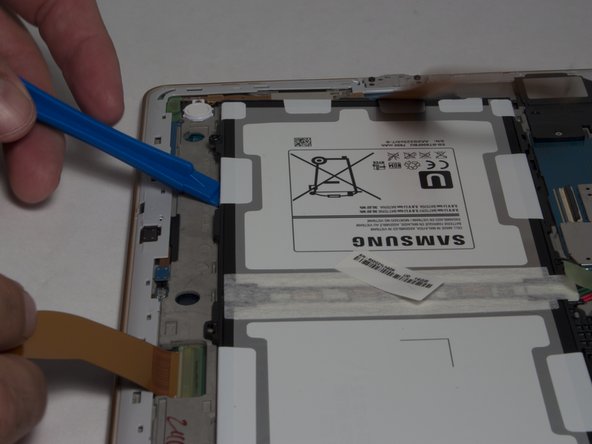
- Place the plastic opening tool between the frame and battery.
- Move the plastic opening tool in a downward motion, away from the battery to bring the battery out of the device.
- Hold the battery and disconnect the plug to remove the battery.