Asus Chromebook C300MA-DH02 Battery Replacement
ID: 98888
Description: The battery is responsible for supplying power...
Steps:
- Flip the Chromebook over so that the underside is facing up.
- Using the Phillips PH #000 screwdriver, remove the 11 "4mm" screws on the back of the device.
- Wedge the plastic opening tool between the bottom cover of the laptop and the keyboard panel.
- Apply pressure and move the plastic opening tool around the border of the laptop until it pops out.
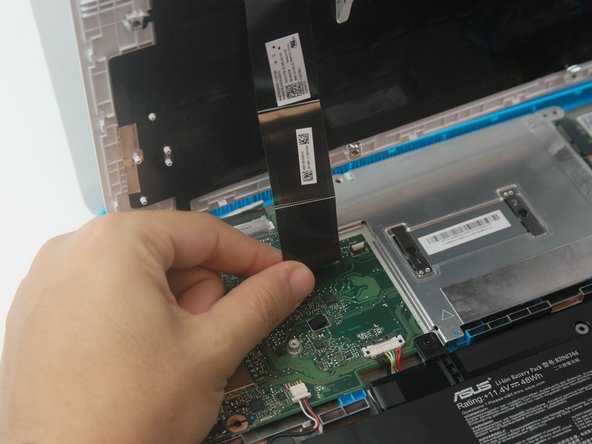
- Once the keyboard panel pops out, slowly move it upwards so that the keyboard connection is visible.
- Remove the keyboard connection from the motherboard by pulling it outwards from the connector.
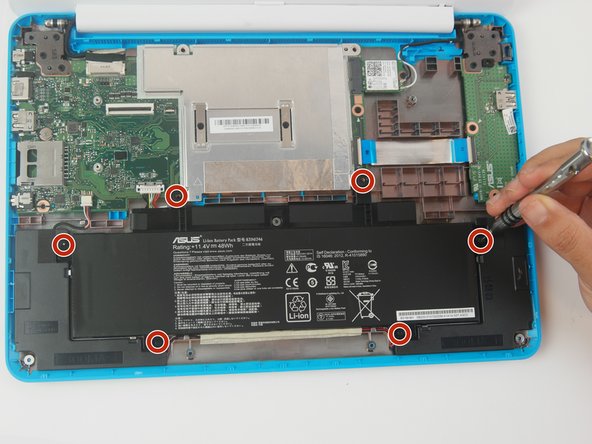
- Remove (6) six "4mm" screws that hold the battery using the Phillips #000 screwdriver.
- Placing two plastic opening tools on each side of the battery connector and gently pull with an even force on both sides of the connector until the connector pops out.
- Note: Your battery may have adhesive on the underside. If you cannot easily remove the battery you can use a hair dryer to evenly warm the glue.
- Remove the battery by applying even force on both sides.
- During reassembly, purchase of adhesive may be necessary.