BLU Vivo 5 Mini Back Cover Replacement
ID: 115371
Description: Use this guide to replace any piece inside your...
Steps:
- Remove the 2 screws along the bottom on either side of the speaker port with the size 2 Pentalobe driver.
- After screws are removed, dislodge the speaker and charger port cover from device using the tweezers.
- Remove the top and bottom covers.
- Start by sliding the pick around the edges of both covers. (If you have the glue adhesive removal tool use that instead of pick, as it creates less damage.)
- After freeing the edges gentle start peeling the covers off.
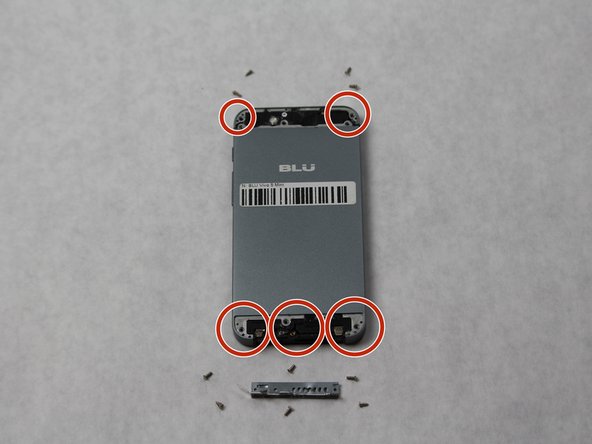
- Using a Phillips #000, remove all 10 screws found on the back of the phone.
- The 6 on the bottom are to be removed with a size PH000 Phillips Head screwdriver.
- The 4 on the top can be removed with the same screwdriver.
- Completely remove SIM card port from side of phone using the SIM Card Eject Tool.
- Release the back cover (it may be glued down encasing the phone) using the suction device to lift the back off.
- Begin inserting the pick sliding it between the back of the phone and the cover to completely remove back cover, if suction does not lift.