Samsung Galaxy Note 10.1 Charging Port Replacement
ID: 115732
Description: If your charging port does not seem to be...
Steps:
- This is the back of the device and where you will begin to take it apart.
- It is necessary to remove the silver piece covering the camera first before removing the bigger back piece.
- Use a metal spudger to pop up the corner of the silver piece.
- Use the plastic opening tools to pry along the edges of the silver piece.
- Lift up the silver piece to reveal the rest of the back cover.
- Remove the three 5mm screws indicated by the red circles with the Philips #00 Screwdriver.
- Using the plastic opening tools pry along the bottom of the device, moving to the sides of the cover to the top.
- Remove the back cover.
- At this point use anti-static gloves or do NOT take it apart on carpet.
- Remove the three 2 mm screws indicated by the red circles with the Phillips #00 screwdriver.
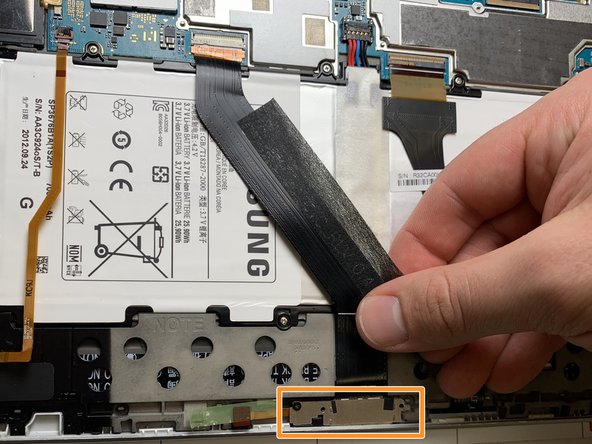
- Pull the charging port indicated by the orange rectangle in picture two out from its position.
- Unplug the black motherboard connector as indicated in the third picture.
- Replace the charging port with a similar model.