ASUS ZENFONE 3 Zoom Motherboard Replacement
ID: 124770
Description: This guide is designed to show how to safely...
Steps:
- Use the sim card attachment for the screwdriver found in the IFIXIT box to remove the sim card tray from the phone.
- Remove the 3.5 mm screws on both sides of the charging port, at the bottom of the phone, using the T2 screwdriver.
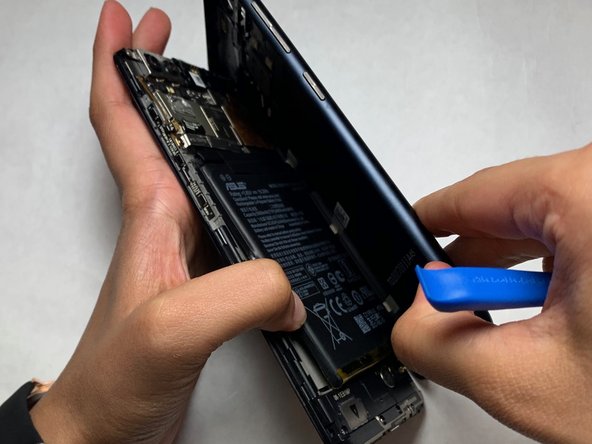
- Use the opening tool to separate the screen and the plastic body of the phone.
- Utilize the PH #00 attachment to remove the 3.3 mm screws in the bracket to the top left of the battery.
- After removing the bracket and screws, pull up on the battery from the bottom of the unit and set aside.
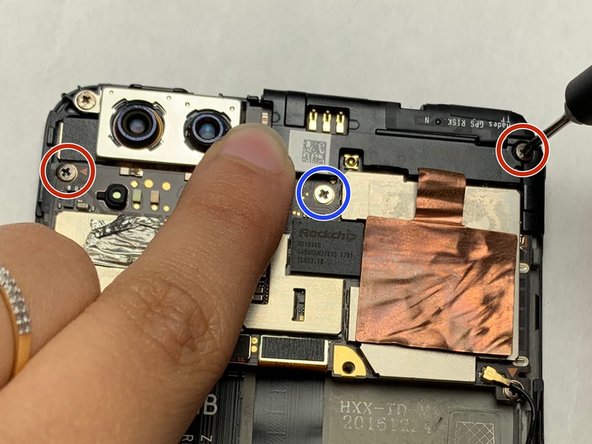
- Remove all three screws near the top of the phone with the PH #00.
- The top right and left screws are 3.25 mm.
- The middle screw is 2.65 mm.
- De-solder the single black speaker wire attached to the left side of the phone.
- Use the flat-edge side of iFixIt plastic spudger to detach both the ribbon connectors off the motherboard at their connection point.
- Use the tweezers to lift up on the edges of the motherboard located above where the battery, and remove the motherboard.
- The finished product should be a motherboard with no connections to the body of the phone.