Lenovo ThinkPad X280 Fingerprint Scanner Replacement
ID: 145514
Description: This replacement guide will enable users to...
Steps:
- To begin, ensure that the device is completely powered off and not connected to an energy supply.
- Close the device and flip it over to expose the back panel.
- Use a Phillips #1 screwdriver to unscrew the five captive screws on the back panel until a small pop is heard.
- These are captive screws and do not come out completely.
- Gently wedge an opening tool or spudger under the back panel, and loosen the clips around the perimeter until the back panel comes off.
- Remove the back cover.
- Using the Phillips #1 screwdriver, remove the four 5 mm screws that are holding the battery down.
- Remove the battery.
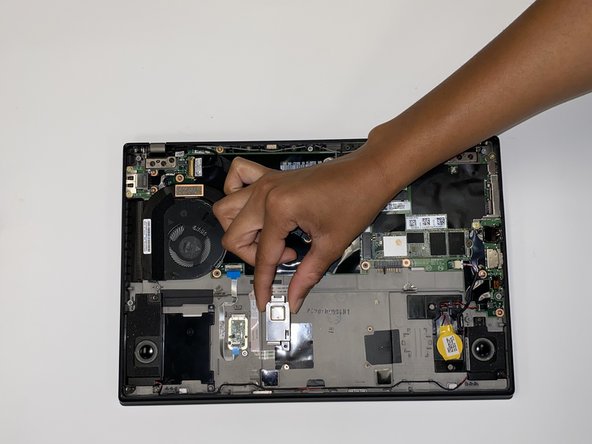
- Using a Phillips #1 screwdriver, remove one 5 mm screw from the fingerprint sensor.
- Remove the metal plate covering the sensor.
- Using the black spudger tool, flip up the small hinged locking flap connected to the motherboard.
- Gently pull the cable out of the connection site.
- Remove fingerprint scanner and metal covering from device.