Beko DHR73431W Capacitor Replacement
ID: 145536
Description: This guide covers replacing a capacitor on a...
Steps:
- Remove the two Phillips 02 (cross-head) screws securing the lid
- Capacitors store dangerous levels of electrical current, they must be discharged before handling. To begin UNPLUG the device from the mains, and let it sit for a few hours Make sure you let the power drain before opening BEWARE: it is possible for capacitors to store a life-threatening charge for months or years.
- Before commencing work inside or attempting to handle the capacitor, very cautiously short the terminals to ground and dissipate any residual charge.
- Unscrew and remove the five Phillips 02 cross-head screws of the side panel
- Remove the single Phillips 02 cross-head screw on the bottom
- Remove the two Phillips 21 cross-head screws from the top
- WARNING! Discharge any residual current from the capacitor before continuing.
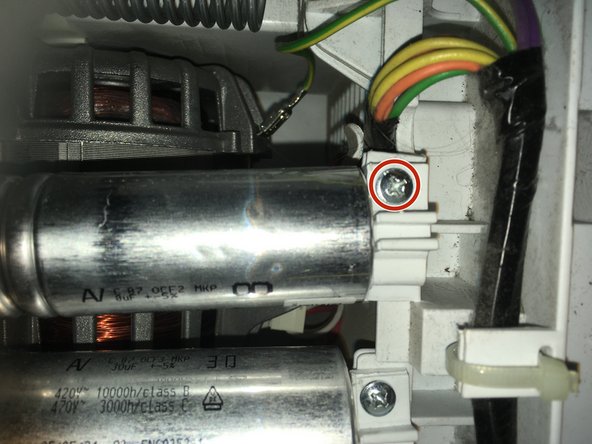
- Remove the single Phillips 02 cross-head screw for the capacitor labeled with a large '8'.
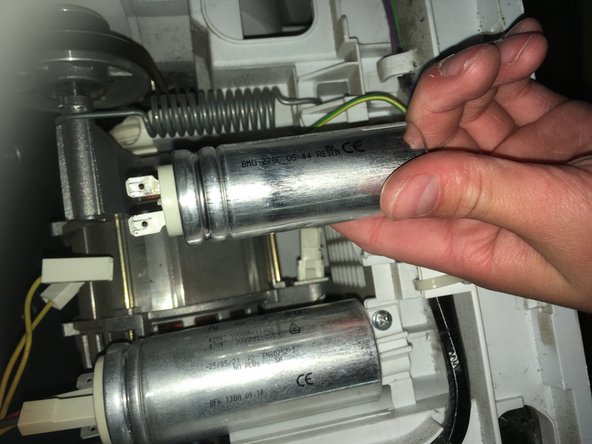
- Unplug the two connectors at the base of the capacitor