How to Perform a Battery Cycle Reset
ID: 152044
Description: Use this guide to perform a battery cycle reset...
Steps:
- Download the Self Repair Assistant app from ApkMirror (2.0.44)
- You may be prompted with a "File might be harmful" warning. If so, select "Download anyway."
- Open the "My Files" app.
- Navigate to the "Installation files" tab on the left side of the screen.
- Select the app on the right side of the screen.
- If the app doesn't show up on this panel, skip to the next step.
- Select "Install" to confirm the app's installation.
- Skip the next two steps.
- If your app didn't show up on the "Installation files" tab, follow the next two steps to rename the file.
- Navigate to the "Downloads" tab on the left side of the screen.
- Long press the download file until an orange checkmark appears to the left of it.
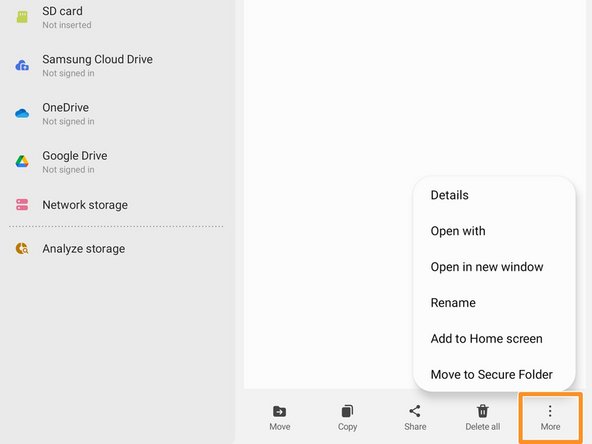
- Navigate to the bottom of the screen and select the "More" option.
- Select the "Rename" option.
- Delete the .jar at the end of the app's name.
- Your file should now appear in the "Installation files" tab.
- Select the Galaxy Cal app.
- Select "Agree" to accept the Terms and Conditions.
- Select the "Battery" icon.
- Select "Calibrate" to continue.
- If you want to perform a fingerprint sensor calibration instead, follow this guide.
- Select the "Start" button.
- Select the "Start" button again.
- Select "Ok" to finalize the battery cycle reset.
- Wait until the battery cycle reset finishes.
- You may need to reset your device for battery cycle reset to apply.