Lenovo ThinkPad T490 RAM Replacement
ID: 170633
Description: In this guide, we show you how to uninstall and...
Steps:
- Remove the screws from the base plate using a Phillips #00 screwdriver to access the motherboard.
- Once the screws are off, gently fit the iFixit Opening Tool under the base plate to pry it open.
- Fully remove the base plate so you can access the RAM.
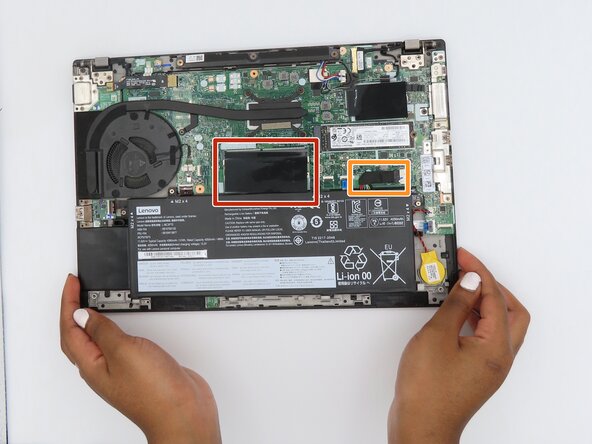
- Locate the RAM module.
- Locate the laptop's battery cable.
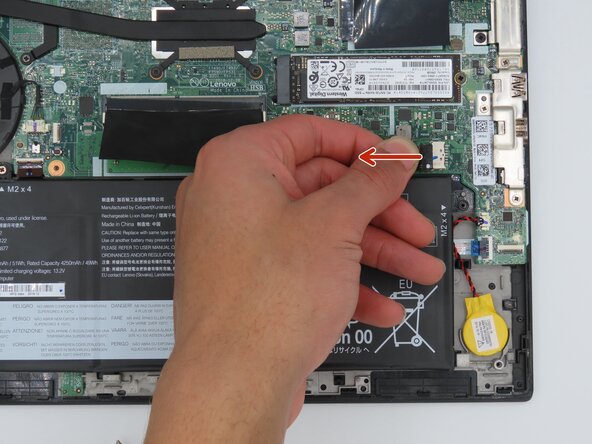
- To disconnect the battery, tug the black tab away from the socket as shown. This will separate the connector from the socket.
- Be cautious when handling any batteries. A punctured or damaged battery is a fire risk and should be disposed of immediately.
- This step helps with the reinstallation process.
- Flip up the black flap that is covering the RAM stick.
- Once the black flap is out of the way, hold the RAM stick on both sides and gently pull directly backward to remove it from its slot.
- Slide the replacement RAM stick in and place the black flap back over it to begin reassembling your device.