Cherry Gentix 4K Maus - Disassembly
ID: 173617
Description:
Steps:
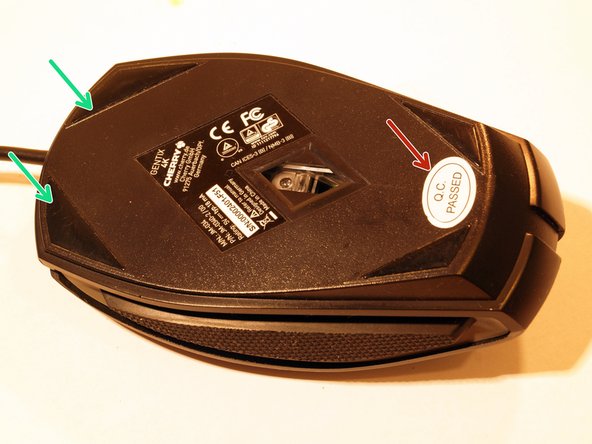
- Remove the "Q.C. Passed" Sticker to have access to the Phillips screw below.
- Pull of the two upper mouse feet. It's enough to just remove half of the mouse feet to get to the screws.
- It is useful to pull of the mouse feet with the adhesive film.
- Remove the three Phillips screws.
- Lift the upper part of the mouse.
- Fold the upper and the lower part back like a book and put it aside.
- Loose the plug with the flat end of a spudger.
- Pull the plug.
- Lift the two side parts and put it aside.
- Loose the plug with the flat end of a spudger.
- Pull the plug.
- There are two plasic clips. Loose the left plastic clip very carefully.
- Fold the board up from the left side.
- Take out the board and put it aside.
- Move the mouse wheel a bit to the right.
- Take the mouse wheel out of the guide forks.
- Reference picture of the board.
- Remove the four Phillips Screws.
- Remove the weight.
- Remove the board.
- Have a look at the plastic clips
- Plastic clips for the black upper part for clicking.
- Plastic clips for the DPI button.
- Insert the flat end of the spudger into the gap between the two halves on the left and right. The rear plastic clips should then release automatically.
- Loose the plastic clips in the middle.
- Insert the spudger from the left and right side between both parts. The plastic clips should release automatically form their rest postion.
- Alle plastic clips are now released.
- Insert the flat end of a spudger into the gap between the two parts.
- Increase the gap all around until the pieces fall apart.
- Unlock the two plastic clips.
- Use the flat end of a spudger to lift and remove the DPI button.
- Overview of all parts.