Roccat Vulcan II Mini Air Backplate Replacement
ID: 180226
Description: This guide is meant to showcase how to remove...
Steps:
- Flip your keyboard over so the bottom is facing up.
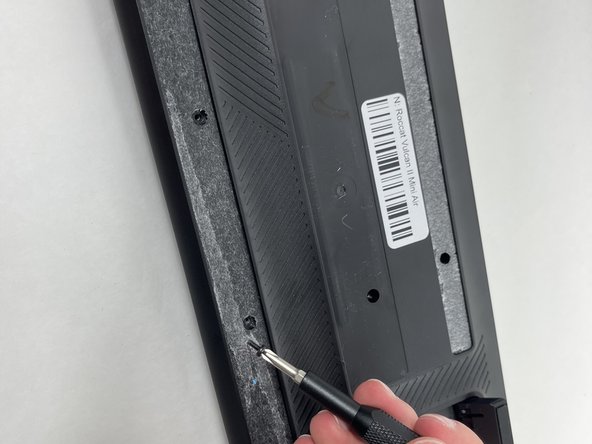
- Before you begin, gently peel the sticker in the center and rubber strip that runs along the bottom and top to expose all the screws.
- Be sure to save the rubber screw covers for reinstallation when you're finished.
- Use a Phillips #0 screwdriver to remove all of the screws from the back plate.
- Keep the screws for the replacement.
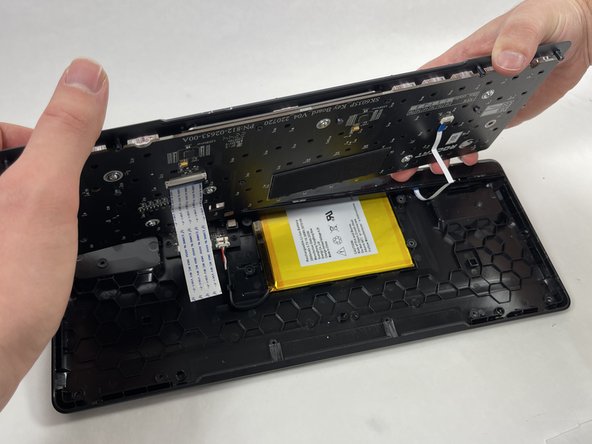
- With the screws removed the backplate will be loose and can be removed. Be careful, as it is still attached to the switch plate with ribbon cables so don't pull it.
- Gently lift the switch plate from the backplate, setting them next to each other with the ribbon cables facing upwards.
- Use a spudger or a clean fingernail to flip up the locking flaps of the two ZIF connectors using the widest tool possible to avoid damaging the delicate hinge pins.
- This is the unlocked position.
- Use tweezers or your fingers to gently pull the cable out of its socket by the pull tab.
- You could damage the cable by gripping it directly.