Casio Poptone LDF-51 Series Battery Replacement Battery Replacement
ID: 181923
Description: The Poptone Chronograph LDF-51 is a fun,...
Steps:
- First, we will want to make sure that you are working in a well-lit space and have an area to catch any of the screws that you will remove
- Make sure to have a small Philips screwdriver like the J000 in the iFixit Pro Tech Toolkit
- Lastly, you will need to make sure your have a pair of tweezers (recommended) or a thumbtack to remove the latch for the battery
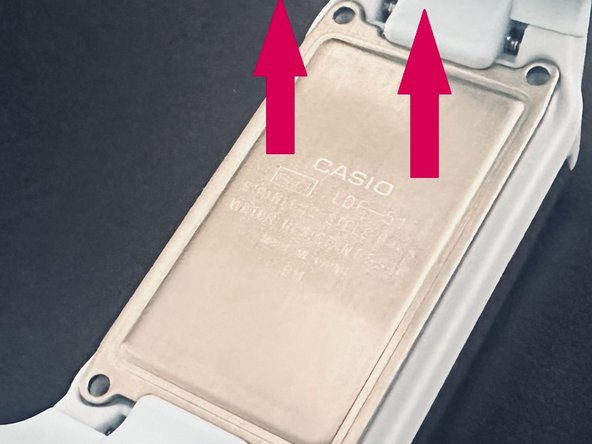
- Remove the back cover by unscrewing the four screws at the back using a J000 screwdriver
- Take care not to strip the threads
- Once all screws have been removed store them in a safe place
- Carefully remove the back cover of the Poptone making sure not to flip the watch over
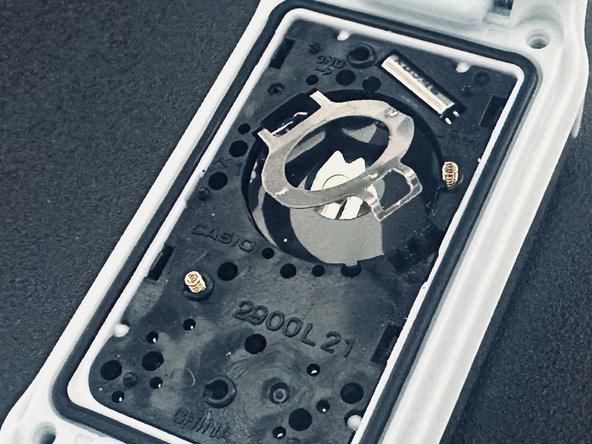
- Carefully remove the sticker covering the back of the battery. We will be saving and re-applying it
- To release the battery from the battery holder you will need to:
- 1. Place your tweezers in the latch and pull in the direction of the green arrow. If you do not have a pair a tweezer, use a tack and place the tack between the latch and battery space and pull out
- 2. Pull the latch all the way up to release the battery following the direction of the pink arrow
- Be careful not to accidentally knock off one of the ground pins
- Now we can remove the battery from the latch
- The replacement battery type is a CR1216 3V with the OEM battery being a Sony
- Follow these steps in reverse to reseat the battery and complete the replacement